Pocket Computers · Volume 6
Operating the PC-1
The PC-1 is two machines in one case: a scientific calculator that takes whole expressions typed as they are written, and a BASIC computer. Both are reached from the same keyboard, and the four modes on the MODE key decide which is in charge. Every example in this volume is taken from Radio Shack’s owner’s manual and checked against the scanned pages; the page numbers are the manual’s own.
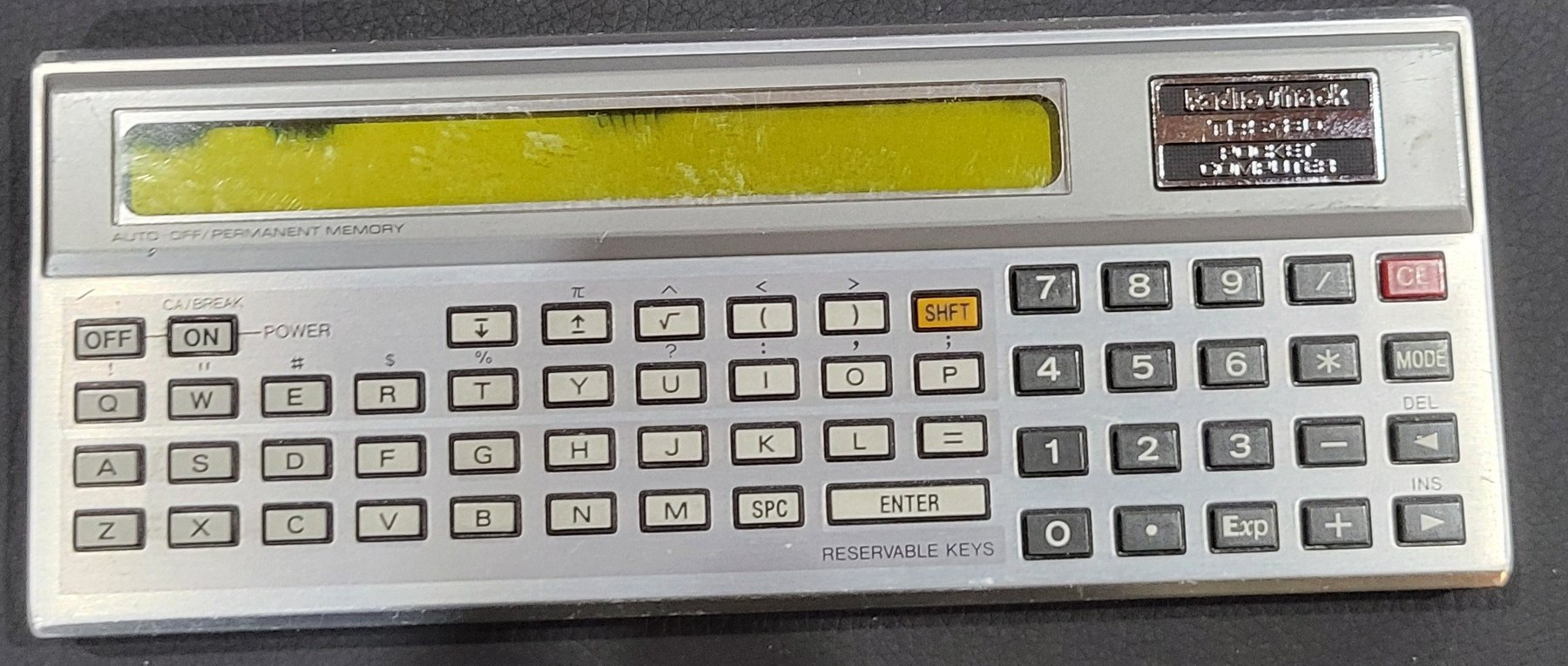
6.1 Switching on and the modes
Press ON. The display shows the prompt > with the angle mode and the operating mode in small letters above it: DEG and RUN after a reset. A dot at the top right shows the cells are good; “when the battery indicator is not lit,” the manual says, replace them.
MODE steps through the four modes in turn, DEF → RUN → PRO → RESERVE:
Table 1 — MODE** steps through the four modes in turn, **DEF → RUN → PRO → RESERVE
| Mode | For |
|---|---|
| RUN | calculations, and running programs |
| DEF | running a program from a label with SHFT and a letter |
| PRO | writing and editing programs |
| RESERVE | writing the reservable keys |
SHFT gives the symbols printed above the keys. CL clears the line being typed; ON, pressed while the machine is on, clears everything typed and stops a running program. OFF switches off; so does the machine itself after about seven minutes without a key.
6.2 Calculating
In RUN mode the PC-1 is a calculator that reads an expression as it would be written on paper and works it out when ENTER is pressed (p. 18):
Table 2 — In RUN mode the PC-1 is a calculator that reads an expression as it would be written on paper and works it out when ENTER is pressed (p. 18)
| Keys | Display | |
|---|---|---|
| CL 7 − 9 + 14 | 7-9+14_ | |
| ENTER | 12. | answer |
| CL − 4.2 + 5 − 12.3 | -4.2+5-12.3_ | |
| ENTER | -11.5 | answer |
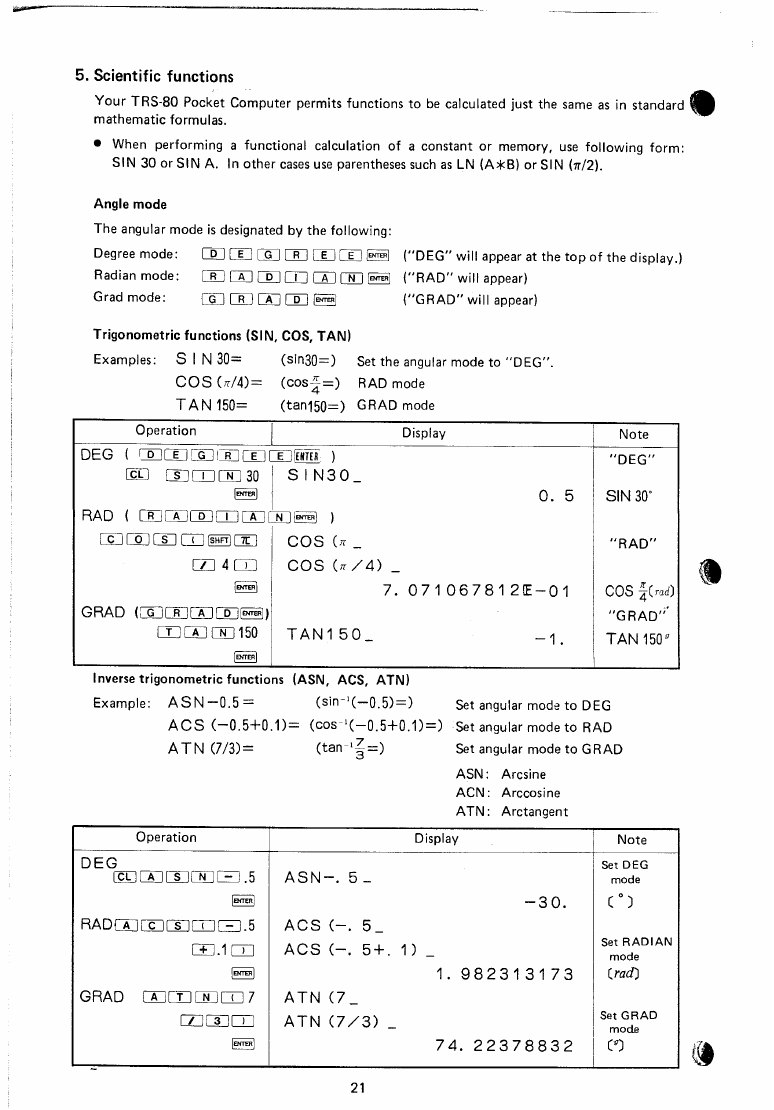
The angle mode is set by typing DEGREE, RADIAN or GRAD and pressing ENTER; the annunciator changes to match. Functions take a number or variable directly, SIN 30 or SIN A, and anything longer in brackets (p. 21):
Table 3 — The angle mode is set by typing DEGREE, RADIAN or GRAD and pressing ENTER; the annunciator changes to match. Functions take a number or variable directly, SIN 30 or SIN A, and anything longer in brackets (p. 21)
| Mode | Typed | Display |
|---|---|---|
| DEG | SIN30 | 0.5 |
| RAD | COS(π/4) | 7.071067812E-01 |
| GRAD | TAN150 | -1. |
| DEG | ASN-.5 | -30. |
| RAD | ACS(-.5+.1) | 1.982313173 |
| GRAD | ATN(7/3) | 74.22378832 |
Comparisons give 1 for true and 0 for false (p. 24): (5+8)>(3*4) gives 1., and (24/5)<=(2.4*2) gives 1. as well, since both sides are 4.8.
Variables are filled directly: A=3 ENTER, B=4 ENTER, then C=√(A*A+B*B) ENTER shows 5. (p. 32). After an answer, the ◀ and ▶ keys bring the last line back for editing, so a calculation can be changed and run again without retyping it.
6.3 A first program
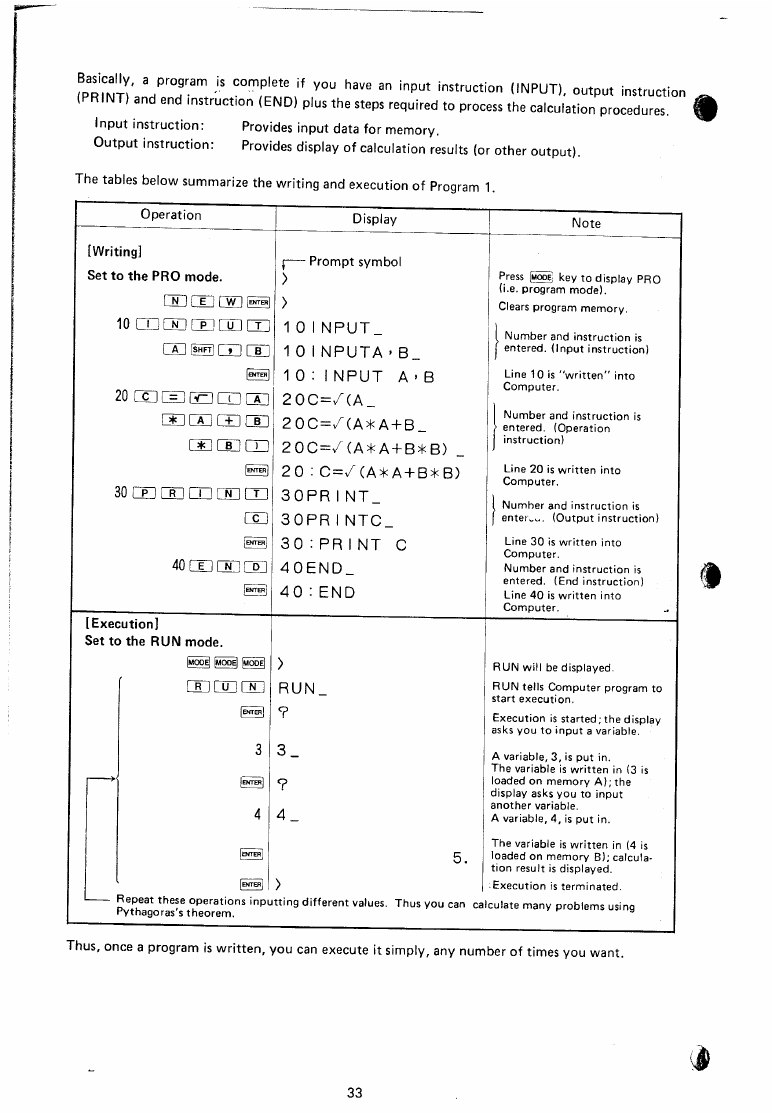
The manual’s first program is Pythagoras’s theorem (pp. 32–33):
10 INPUT A,B
20 C=√(A*A+B*B)
30 PRINT C
40 END
To enter it:
- Press MODE until PRO shows.
- Type
NEWand ENTER to clear the program memory. The prompt>appears. - Type
10INPUTAthen SHFT and the comma key,B, and ENTER. The line is stored and shown as10:INPUT A,B. - Type lines 20, 30 and 40 the same way, pressing ENTER after each.
√is SHFT on its key.
To run it:
- Press MODE three times, through RESERVE and DEF, to RUN.
- Type
RUNand ENTER. The display shows?. - Type
3and ENTER. The display shows?again. - Type
4and ENTER. The display shows5. - ENTER again ends the program and brings back the prompt.
Running it again with other values solves any right-angled triangle. DEBUG in place of RUN steps through the program one line at a time.
6.4 Editing
In PRO mode, ↑ and ↓ step through the program line by line, and LIST with a line number shows that line. To correct a line, bring it up, move the cursor with ◀ and ▶, type over the mistake, and press ENTER. INS and DEL, both on SHFT, insert a space and delete a character. Because a keyword such as PRINT is stored as one step, the cursor treats it as one character: changing its first letter removes the whole keyword (p. 38). Typing a line number with nothing after it deletes that line; typing a new line with a number between two others inserts it in its place. MEM shows how much room is left.
6.5 PRINT, PAUSE and USING
PRINT shows a result and stops until ENTER is pressed. PAUSE shows it for about 0.85 seconds and carries on. Two items separated by a comma share the display, twelve characters each.
USING sets the format of numbers (p. 57). Each # before the point is one digit, counting the sign; each after it is a decimal place; ^ asks for scientific notation. With the number 123.4567891:
Table 4 — USING sets the format of numbers (p. 57). Each # before the point is one digit, counting the sign; each after it is a decimal place; ^ asks for scientific notation. With the number 123.4567891
| Format | Display |
|---|---|
USING (cancels any format) | 123.4567891 |
"###" or smaller | error 6: it cannot fit |
"####" | 123 |
"####." | 123. |
"######.#" | 123.4 |
"#######.###" | 123.456 |
"##.###^" | 1.234E 02 |
A format can be given inside the statement, as in PRINT USING "###.##";A.
6.6 The reservable keys
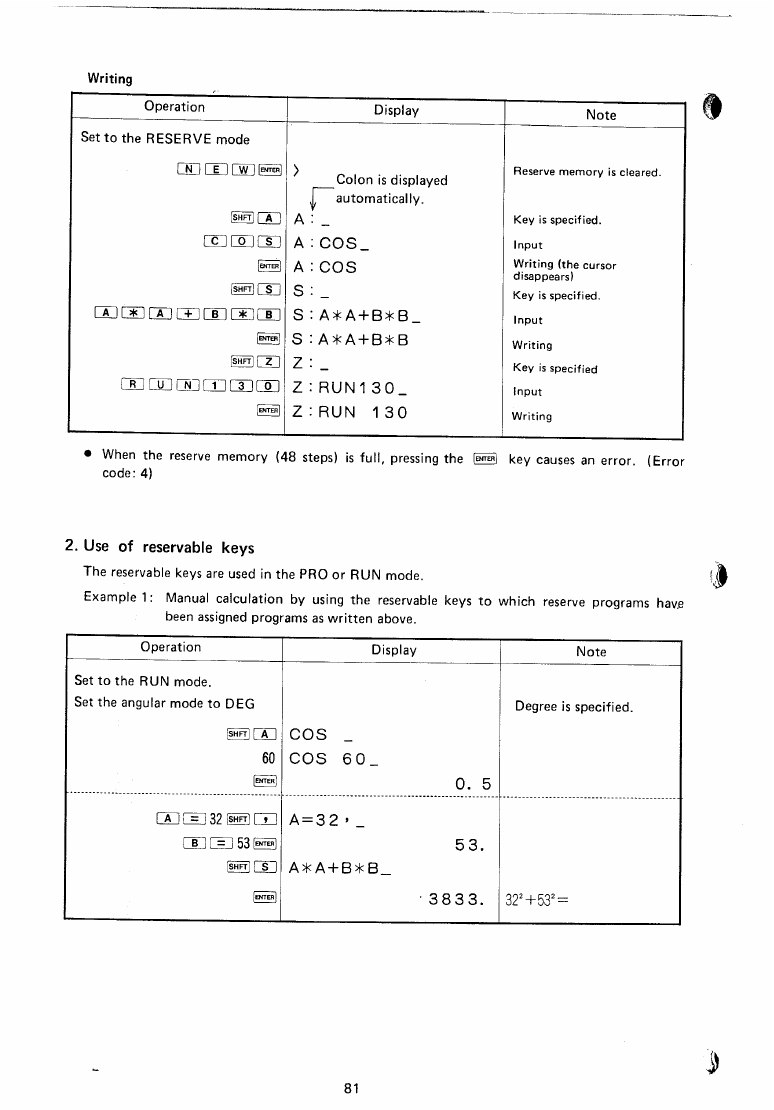
The reservable keys save typing (pp. 80–81). In RESERVE mode:
Table 5 — The reservable keys save typing (pp. 80–81). In RESERVE mode
| Keys | Display | |
|---|---|---|
NEW ENTER | > | clears the reserve memory |
SHFT A, COS, ENTER | A : COS | COS on the A key |
SHFT S, A*A+B*B, ENTER | S : A*A+B*B | an expression on S |
SHFT Z, RUN130, ENTER | Z : RUN 130 | a command on Z |
Then, in RUN mode with DEG set:
Table 6 — Then, in RUN mode with DEG set
| Keys | Display |
|---|---|
| SHFT A | COS _ |
60 | COS 60_ |
| ENTER | 0.5 |
A=32,B=53 ENTER | 53. |
| SHFT S | A*A+B*B_ |
| ENTER | 3833. (32² + 53²) |
6.7 Labels and the DEF mode
A program line can begin with a label in quotes, such as 100 "C": INPUT R. In DEF mode, pressing SHFT and that letter runs the program from the label, so one memory can hold several programs, each started from its own key. The DEF annunciator shows when this mode is on.
6.8 Errors
When something cannot be done, the PC-1 shows a code (pp. 85–86). Typed in RUN mode, 5+*3 and ENTER gives an error with code 1; pressing ◀ or ▶ brings the line back with the cursor on the *, where the fault is. In a program, a faulty line 30 shows as 30: with the code beside it, and ↑ shows the line with the cursor at the fault.
Table 7 — Errors
| Code | Meaning |
|---|---|
| 1 | syntax error; a result of 10¹⁰⁰ or more, or division by zero; a number used as a string or a string as a number |
| 2 | the line or label in GOTO, GOSUB, RUN, DEBUG or LIST does not exist |
| 3 | more than four levels of GOSUB or of FOR–NEXT; RETURN without GOSUB; NEXT without FOR |
| 4 | not enough memory for the program, the reserve keys or a flexible memory |
| 5 | a tape error: the recording did not match, or a checksum failed |
| 6 | a number will not fit the USING format |
ON or CL clears an error.
6.9 Numbers
The PC-1 calculates with a 10-digit mantissa and a two-digit exponent, from 1 × 10⁻⁹⁹ to just under 1 × 10¹⁰⁰. Numbers between 10⁻⁹ and ±9,999,999,999 are shown in ordinary form, others in scientific notation. A number typed with more than ten digits is shown to ten but, the manual says, “calculations use all input digits”.
Sources
- Radio Shack, TRS-80 Pocket Computer owner’s manual, pp. 13–89, and the reference card.
- Sharp’s PC-1211 instruction manual, Beginner’s Textbook for BASIC and Applications Manual, 314 pages of programs.
- Program books in the Library: Jim Cole’s TRS-80 Pocket Computer Programs, John Clark Craig’s 119 Practical Programs, Pocket Computer Programming Made Easy, and the Wiley self-teaching guide Problem-Solving on the TRS-80 Pocket Computer.
- Radio Shack’s software manuals: Games, Games II, Statistical Analysis and Engineering Math II.
Comments (0)