Pocket Computers · Volume 4
Inside the PC-1
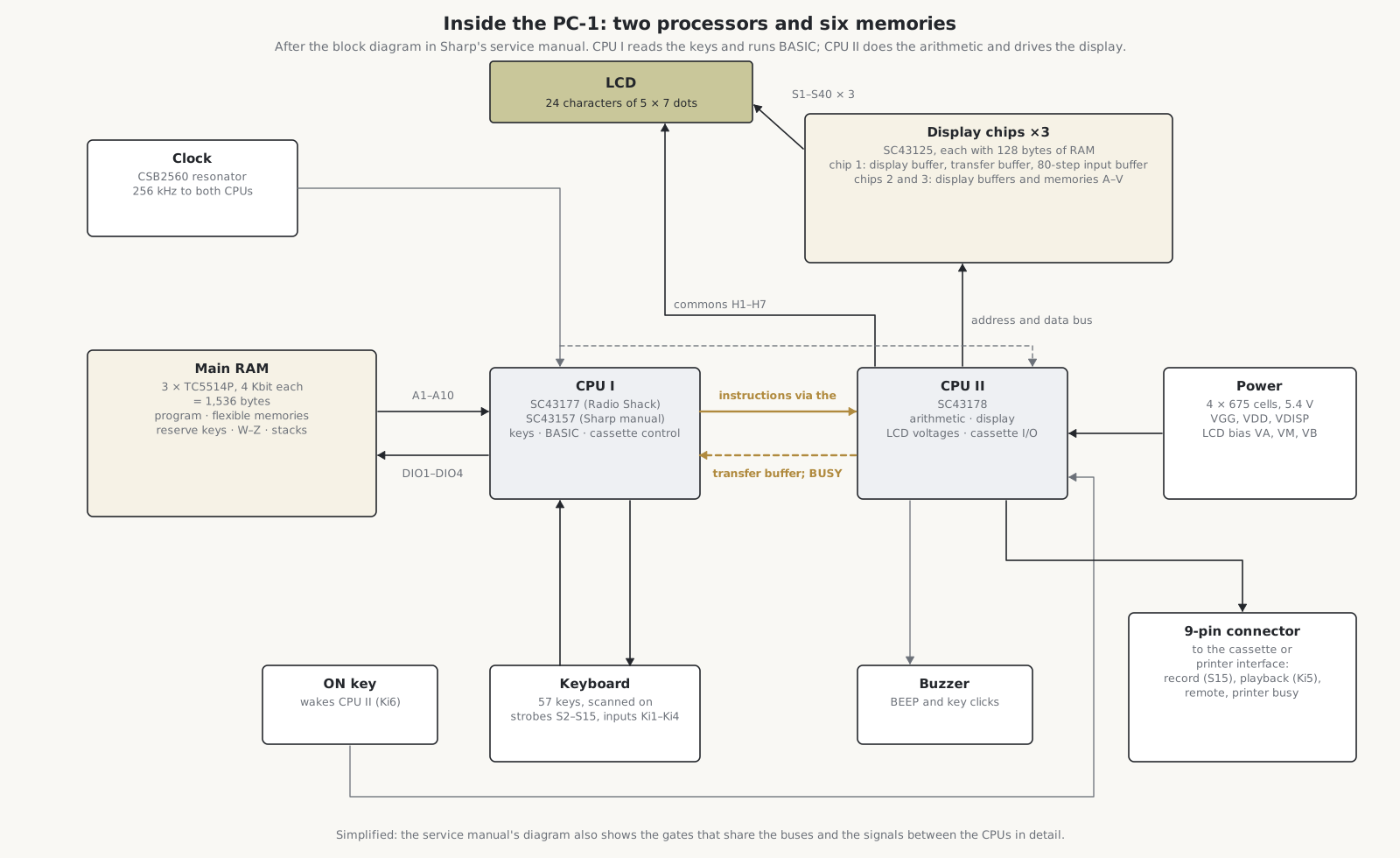
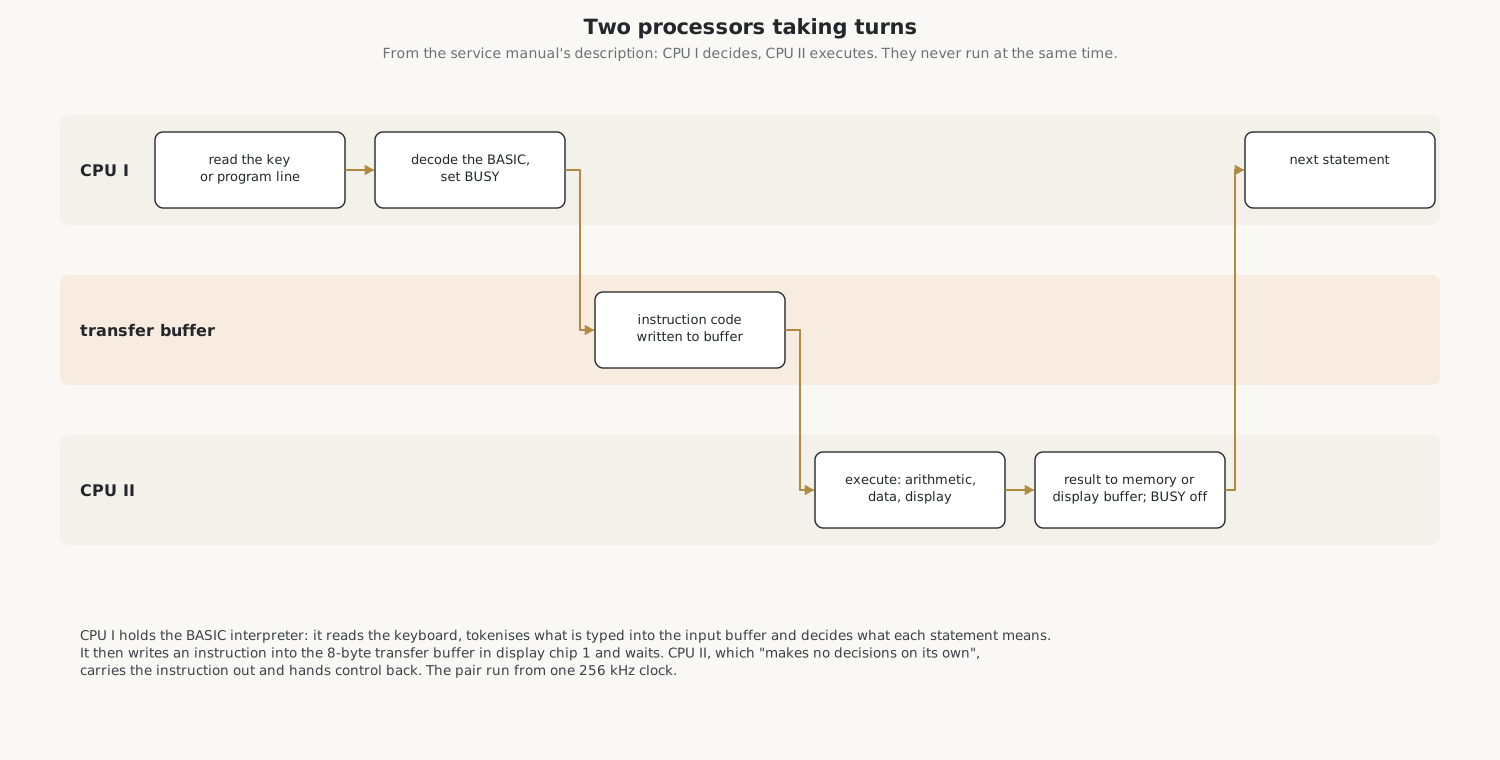
The PC-1 is built like a calculator, not like a computer of 1980. There is no single microprocessor with its memory and peripherals around it. Instead there are two small 4-bit processors made in Sharp’s calculator technology, three memory chips, and three display-driver chips that also hold part of the machine’s memory. Sharp’s Service Manual, PC-1211, CE-121 of 1980 describes every part of it, with a block diagram, the circuit, the memory maps and the waveforms, and this volume follows it closely. Radio Shack’s service manual for the PC-1 is the same document under its own covers.
4.1 The parts
Table 1 — The parts
| Part | Number | What it does |
|---|---|---|
| CPU I | SC43177 by Radio Shack’s manual, SC43157 in Sharp’s | reads the keyboard, holds the BASIC interpreter, decodes each statement, controls the cassette, sounds the buzzer |
| CPU II | SC43178 | carries out the instructions CPU I sends it: arithmetic, moving data, the display; generates the LCD’s drive voltages and common signals; handles the cassette record and playback lines and the printer signals |
| Main memory | 3 × Toshiba TC5514P | CMOS static RAM, 4 Kbit each (1,024 × 4), together 1,536 bytes |
| Display chips | 3 × SC43125 | each drives 40 columns of the display and holds 128 bytes of RAM |
| Clock | CSB2560 | 256 kHz for both processors |
| Logic | TC4011, TC4019, TC4069, TC4066 | NAND gates, a selector, inverters and analogue switches that share the buses |
| Power parts | 2SJ40 MOSFET, thermistor, 250 kΩ trimmer | make the display’s reference voltage |
| Display | LF8017JE | 24 characters of 5 × 7 dots and the annunciators |
The SC43125 display driver was a Sharp calculator part: the Calcuseum records it on the board of Sharp’s EL-702 calculator of about 1980. The part number of CPU I is a small puzzle. Sharp’s manual prints SC43157 in its block diagram, its circuit diagrams and its signal tables; Radio Shack’s manual, Wikipedia and teardown photographs give SC43177. Reading the chip on a real board would settle it.
Together the three RAMs give 1,536 bytes and the three display chips another 384, which is 1,920 bytes: the “1.9K” of the specifications. trs-80.org gives the read-only memory holding BASIC as 11 KB; it is on the processor chips themselves, since the parts list has no separate ROM. It has never been read out, which is why no true emulator of the PC-1211 exists.
4.2 Two processors, one at a time
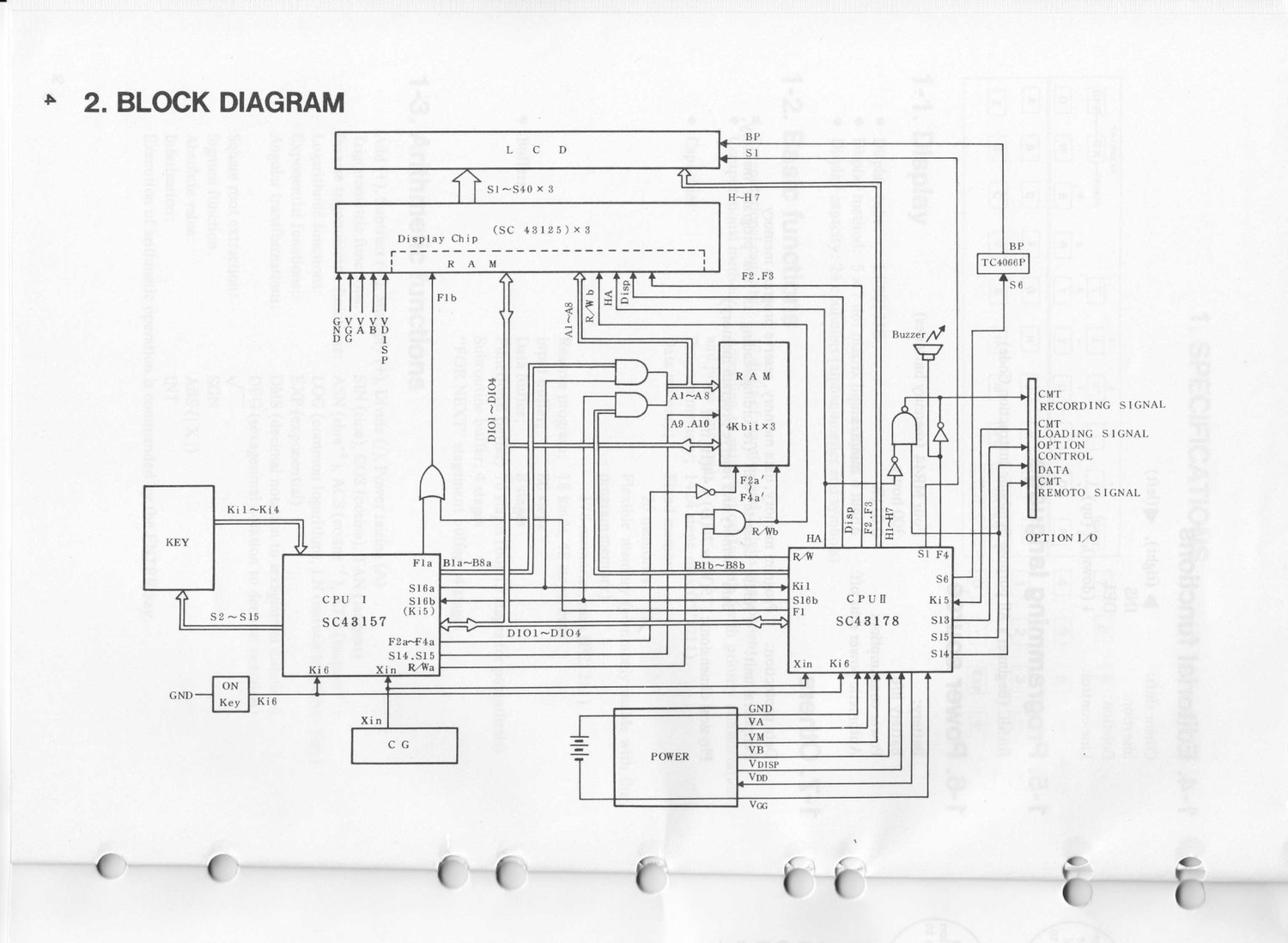
The two processors do not work at the same time. CPU I is in charge: it reads a key or a program line, tokenises it, and decides what each statement means. When there is arithmetic or display work to do, it writes an instruction code into an 8-byte transfer buffer in the first display chip and raises a BUSY signal. CPU II, which in the service manual’s words “makes no decisions on its own”, takes the instruction, carries it out, writes the result to memory or the display buffer, and signals that it has finished; then CPU I goes on. The manual sums it up: “the CPU II constantly receives execution instructions from the CPU I via the transfer buffer.”
4.3 The keyboard
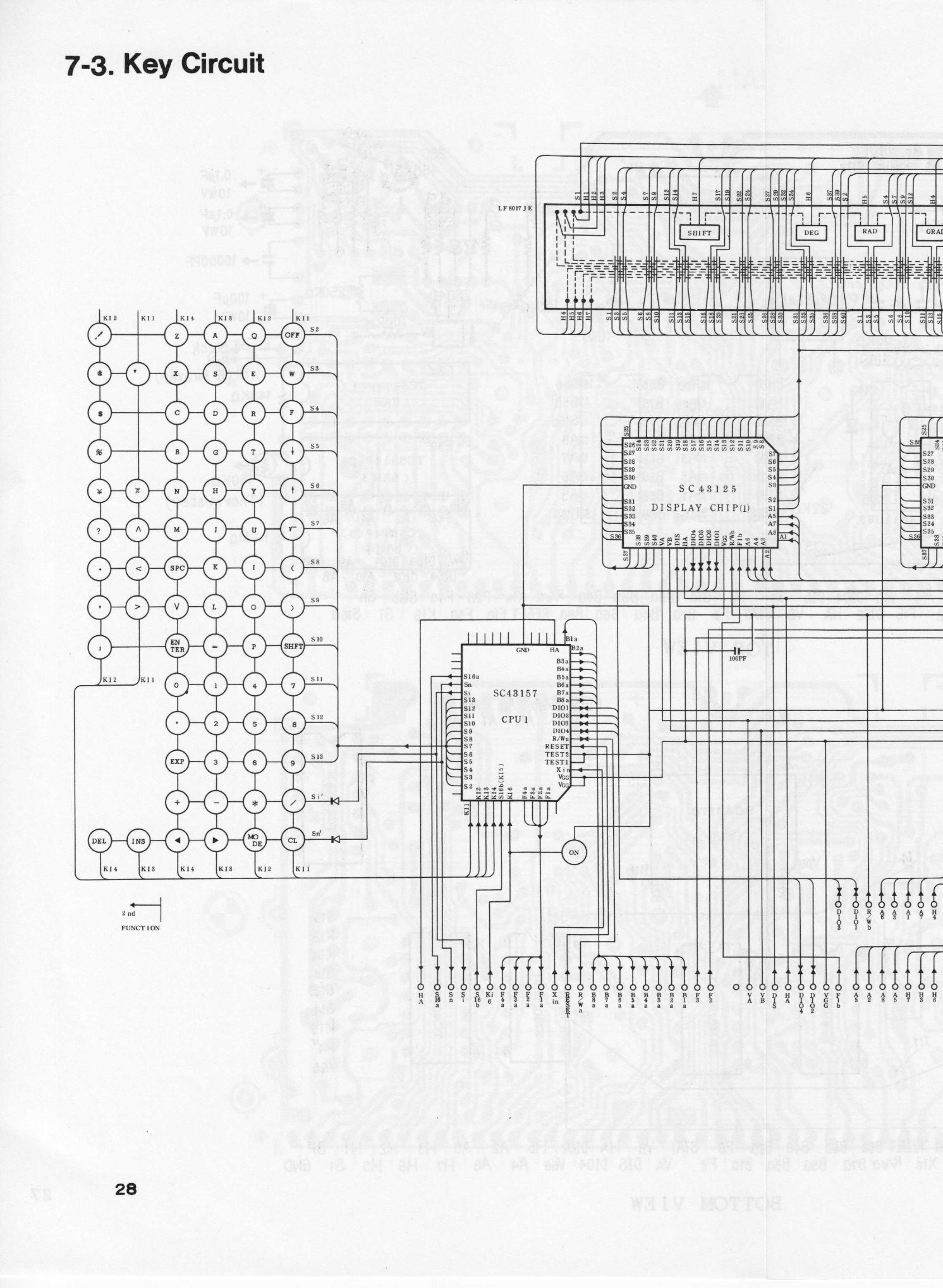
The 57 keys form a matrix scanned by CPU I. Its strobe outputs, S2 to S13, double as address lines for the RAM; two more strobes reach the bottom rows through diodes; and each key closes a contact onto one of four return lines, Ki1 to Ki4. Sharp’s key-circuit page shows the arrangement: the letter keys in a block on the left, the number keys and functions on the right, and DEL, INS, the cursor keys, MODE and CL along the bottom. The ON key is separate, wired to both processors on Ki6, so that it can wake the machine and break into a running program.
4.4 The display
The display is one line of 24 characters, each 5 dots wide and 7 high, with annunciators for DEF, SHIFT, DEG, RAD, GRAD, RESERVE, PRO and RUN and a battery dot at the top right. It is a multiplexed liquid-crystal display:
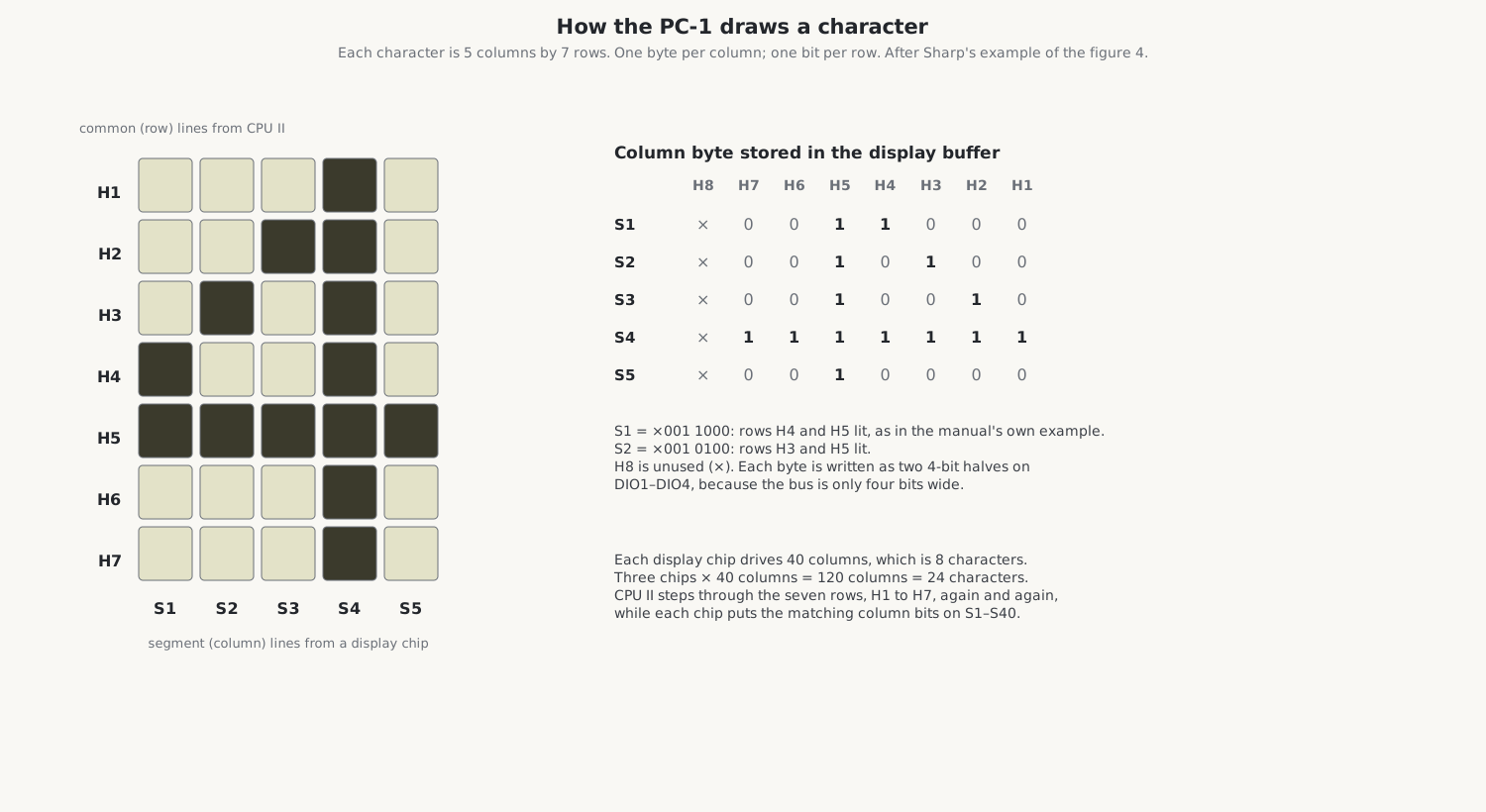
- CPU II drives seven common lines, H1 to H7, one for each row of dots, in turn.
- Each of the three display chips drives forty segment lines, S1 to S40, one for each column of dots: 40 columns are 8 characters, and three chips make 24.
- For each column, the display chip holds one byte in its display buffer, one bit for each row. As CPU II steps through the rows, each chip puts the matching bit of every column on its segment lines.
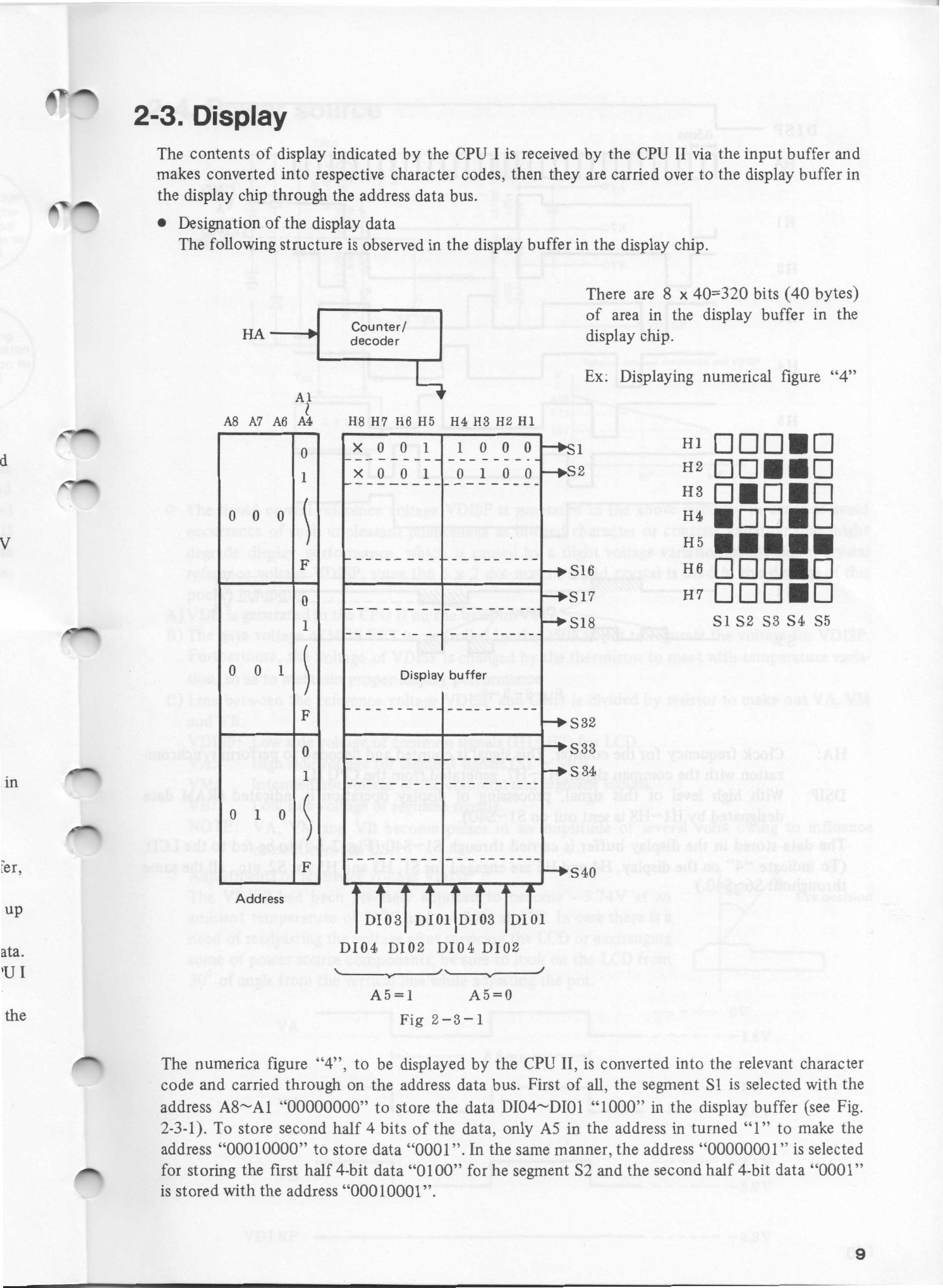
Sharp’s manual gives the example of the figure 4. Its first column has dots in rows 4 and 5, so the byte for S1 is ×001 1000, reading from H8, which is unused, down to H1. The data bus is only four bits wide, so each byte is written in two halves, with address line A5 choosing which.
4.5 The display voltages
A liquid-crystal display needs alternating drive at carefully set levels, and the right levels change with temperature. The PC-1 makes them like this:
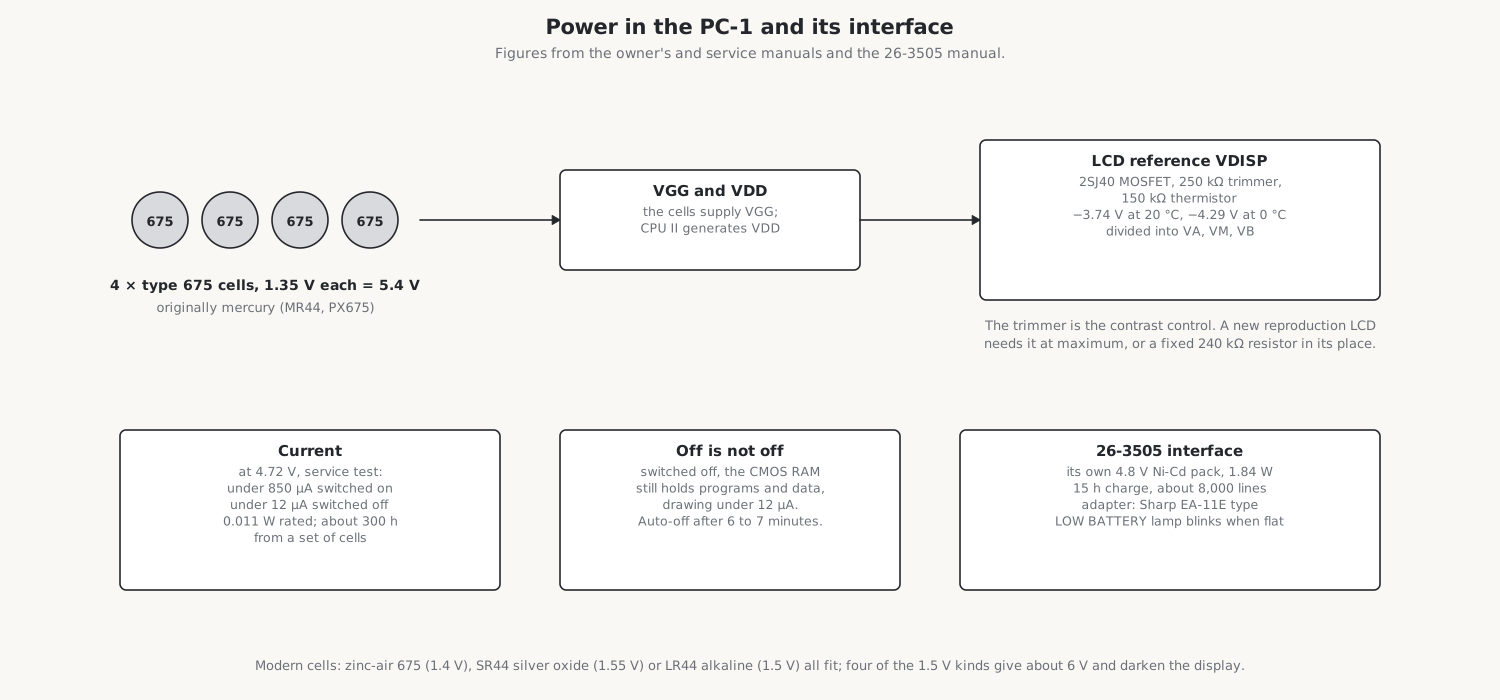
- A 2SJ40 MOSFET, its gate set by a 250 kΩ trimmer, produces the reference voltage VDISP, the low level of the common signals.
- A 150 kΩ thermistor in the same network shifts VDISP with temperature: the manual’s graph runs from −4.29 V at 0 °C through −3.74 V at 20 °C to −3.27 V at 40 °C.
- A chain of resistors, 21.0 kΩ, 12.7 kΩ, 12.7 kΩ and 21.0 kΩ, between VDISP and ground gives the intermediate levels VA (the high side of the segment signals), VM (the middle) and VB (the low side of the segments). The manual’s waveforms show them switching on a cycle of 6.8 ms: VA between 0 and −1.8 V, VM between −1 and −2.8 V, VB between −2.1 and −3.9 V, with VDISP steady at about −3.9 V.
The factory set VDISP to −3.74 V at 20 °C, and the manual tells a repairer to look at the display from 30 degrees off vertical while turning the trimmer. There is no contrast control for the owner. The trimmer matters again when a new display is fitted, as the repair volume explains.
4.6 Power
Four type 675 cells, originally mercury cells of 1.35 V each (MR44 in Sharp’s manual, PX675 elsewhere), give 5.4 V. The owner’s manual rates the machine at 0.011 W, or 0.013 W with the cassette interface, and promises about 300 hours from a set of cells at 20 °C; Wikipedia says more than 200. The service manual’s test, at 4.72 V, allows under 850 µA with the machine on and under 12 µA with it off.
Off does not mean unpowered. The memory is CMOS, kept alive by the cells, so programs, data and the reservable keys survive switching off, which the label beside the display calls “permanent memory”. The machine switches itself off after a few minutes without a key press: about seven by the owner’s manual, about six by the service manual. Taking the cells out loses everything, and after new cells go in the manual says to press the reset switch on the back and then OFF and ON, when the display should show the prompt with DEG and RUN.
The owner’s manual is firm about the cells: “The batteries must be of specified type (675). When other type, such as 675E batteries are used, the display operation will become improper.” Mercury cells have long been unobtainable; the repair volume covers what to use instead.
4.7 The circuit diagram
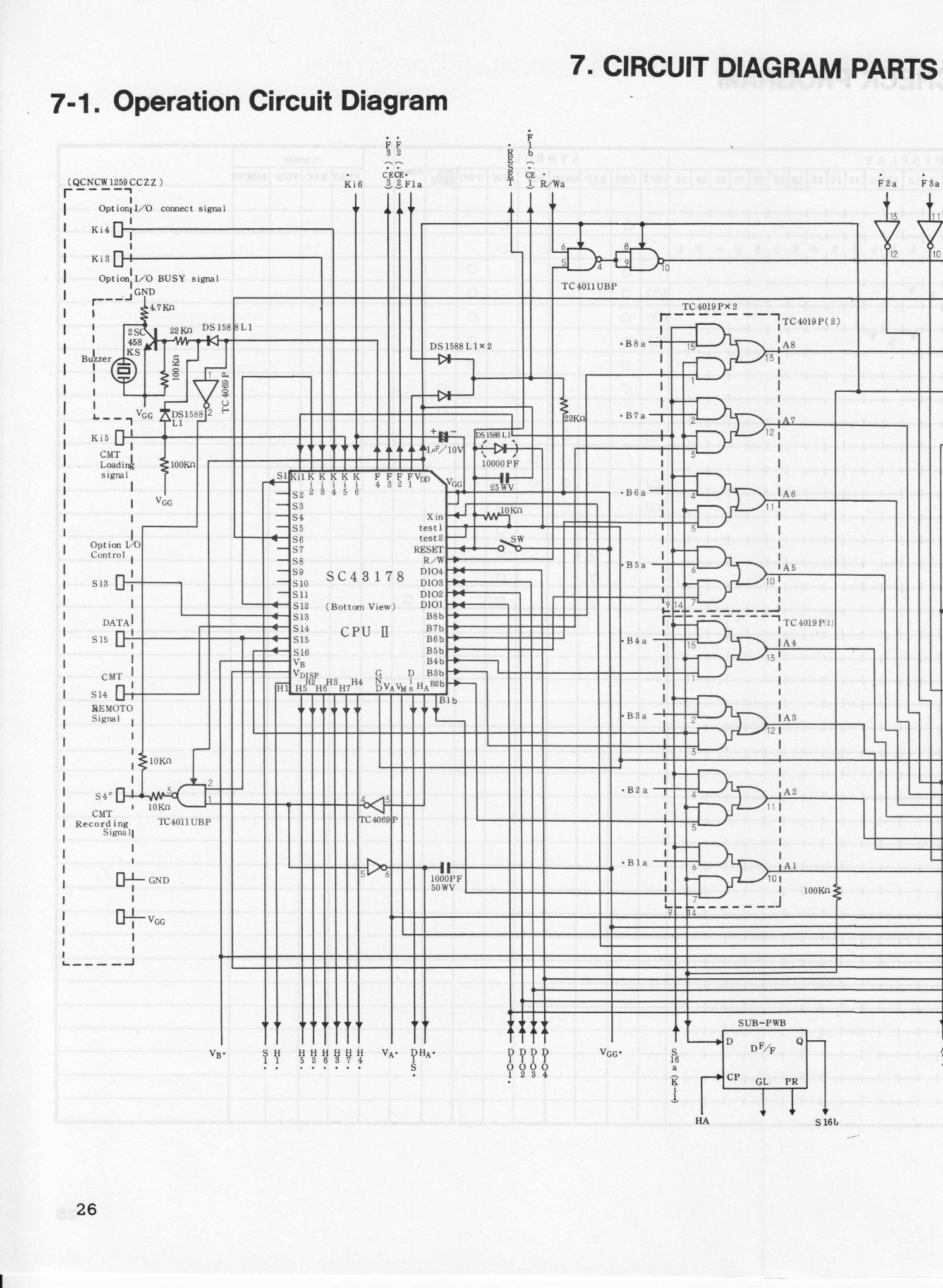
The full circuit diagrams, the board layouts and the parts lists are in Sharp’s service manual and Radio Shack’s PC-1 service manual in the Library.
4.8 The connector
On the left side of the PC-1 is a 9-pin connector for the cassette and printer interfaces. The service manual’s signal lists show what must pass through it: the cassette record signal from CPU II (on its S15 line), the playback signal into CPU II (on Ki5), the recorder’s remote control, the printer’s busy signal, a line that tells the computer a printer is connected, the supply and ground. The pin-by-pin assignment is not given in any source found.
Sources
- Sharp, Service Manual PC-1211, CE-121 (1980): specifications, block diagram (p. 4), RAM (pp. 7–8), display (p. 9), power source (p. 11), signal descriptions (pp. 12–16), circuit diagrams (section 7), parts lists.
- Radio Shack, TRS-80 PC-1 Pocket Computer and Cassette Interface Service Manual and the owner’s manual (specifications, p. 88; batteries, p. 89).
- trs-80.org, Wikipedia (“Sharp PC-1211”), oldcomputers.net, the Université de Rennes PATSTEC record and the Calcuseum for the chip numbers and memory sizes.
Comments (0)