Pocket Computers · Volume 5
How the PC-1 Thinks
The PC-1 has less memory than this page of text: 1,920 bytes in all. Everything it does depends on how that memory is shared, between the program, the variables, the reservable keys, the stacks that BASIC needs, and the buffers the two processors pass work through. Sharp’s service manual maps it byte by byte, and the owner’s manual explains the parts an owner sees. This volume puts the two together.
5.1 The main memory
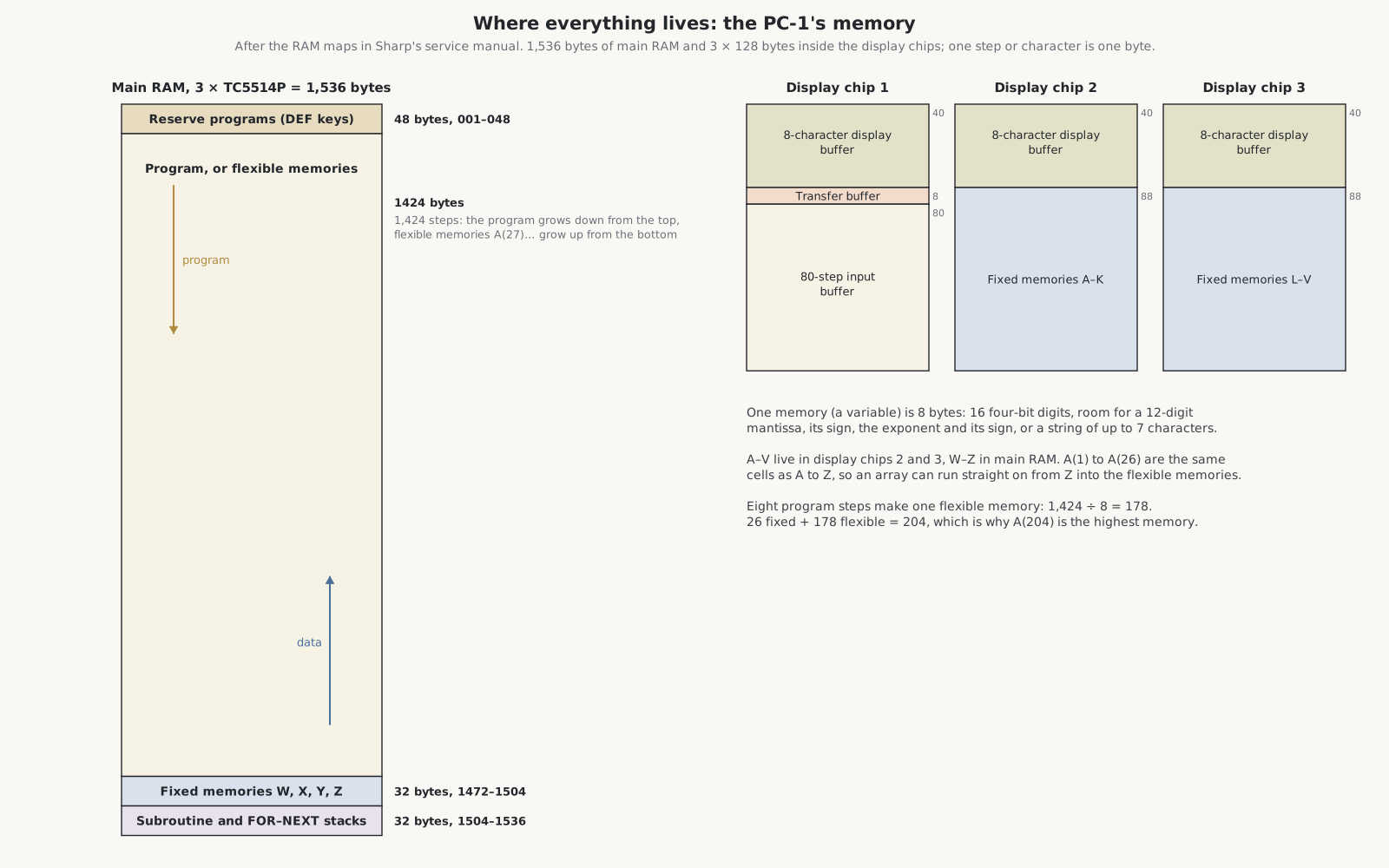
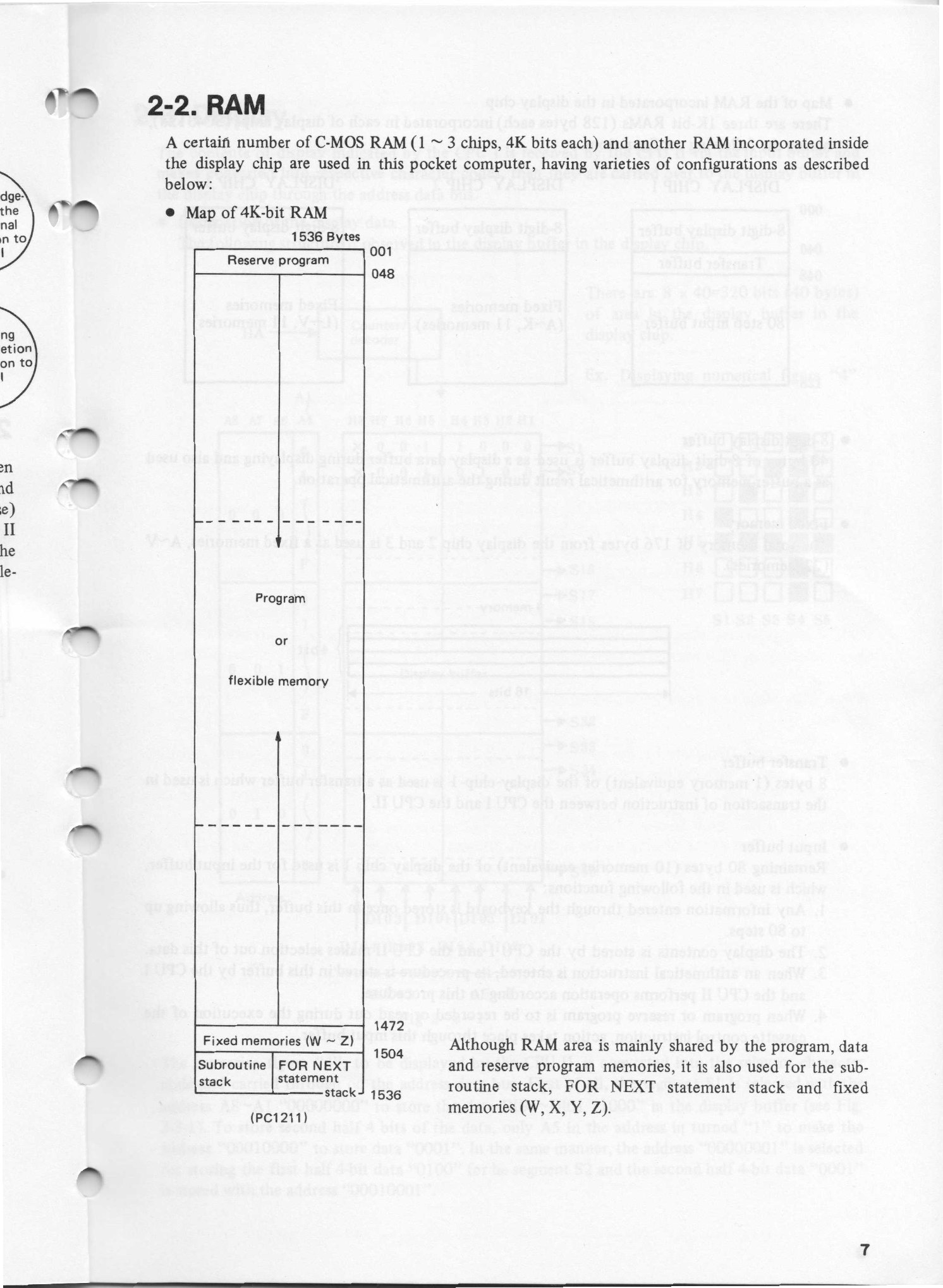
The three 4-Kbit RAM chips give 1,536 bytes. Sharp’s map, from the bottom address up:
Table 1 — The three 4-Kbit RAM chips give 1,536 bytes. Sharp's map, from the bottom address up
| Addresses | Bytes | Use |
|---|---|---|
| 001–048 | 48 | the reserve programs, behind the reservable keys |
| 048–1472 | 1,424 | the program, or the flexible memories, or both |
| 1472–1504 | 32 | the fixed memories W, X, Y and Z |
| 1504–1536 | 32 | the subroutine stack and the FOR–NEXT stack |
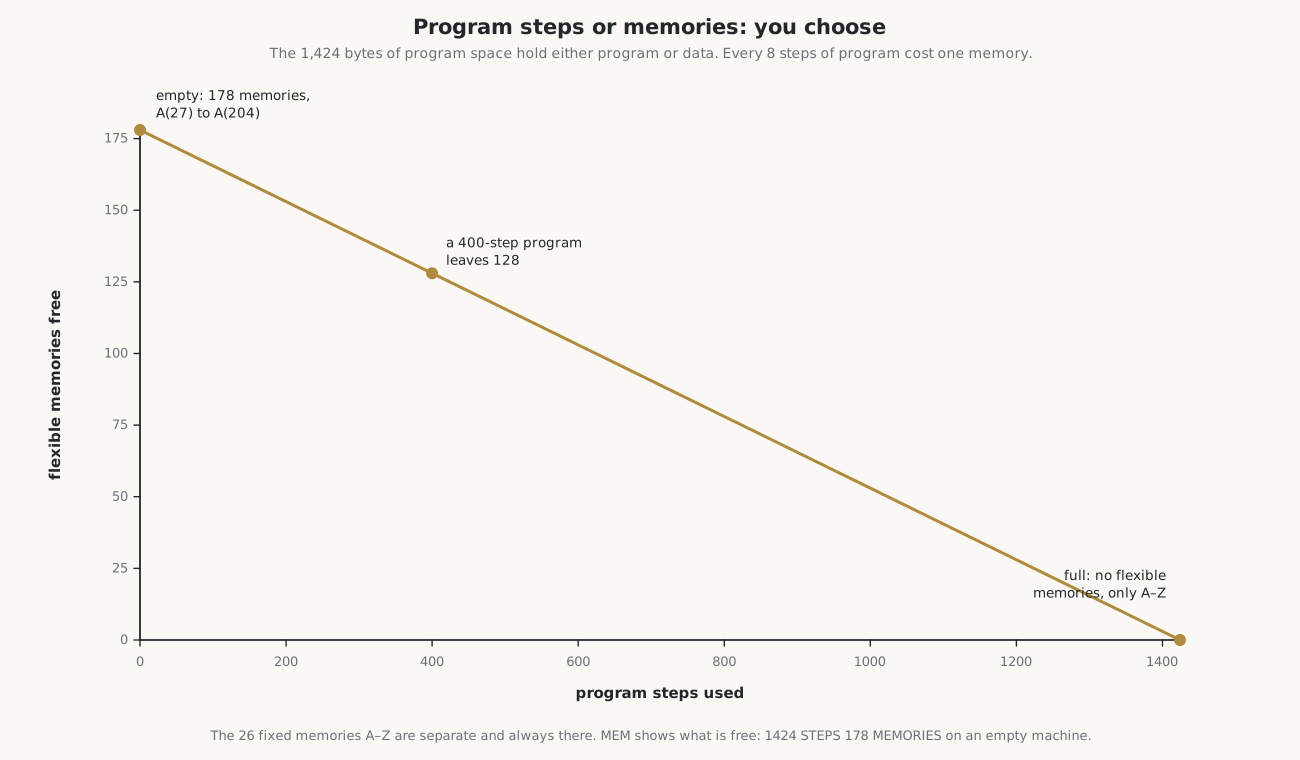
The program grows down through its area from one end and the flexible memories grow up from the other, so the same 1,424 bytes serve either. That is the number an empty machine reports: 1424 STEPS 178 MEMORIES.
5.2 Inside the display chips
Each SC43125 display driver holds 128 bytes, and only 40 of them are needed to drive its eight characters. The rest is used as working memory:
- Display chip 1: its 40-byte display buffer, the 8-byte transfer buffer through which CPU I sends instructions to CPU II, and an 80-byte input buffer. Anything typed goes into the input buffer first, which is why a line can be at most 80 steps. CPU I also writes the procedure for an arithmetic instruction there for CPU II to follow, and programs pass through it on their way to and from tape.
- Display chips 2 and 3: a 40-byte display buffer each, and 88 bytes each for the fixed memories A to K and L to V.
So the variables A to V are in the display chips and W to Z in the main RAM. The display buffers also serve as working space for results during arithmetic, according to the manual.
5.3 Memories
A memory, in the PC-1’s language, is a variable: 8 bytes, which the service manual draws as four rows of 16 bits, or sixteen 4-bit digits. A number is stored as a mantissa of up to 12 digits with its sign, and a two-digit exponent with its sign; the display shows 10 of the 12. The same 8 bytes hold a string of up to 7 characters. Mixing the two, by treating a number as a string or a string as a number, is error 1.
There are two kinds:
- Fixed memories: the 26 variables A to Z, always present. A$ to Z$ are the same memories used for strings, so A and A$ cannot both be in use at once.
- Flexible memories: A(27) upwards, made from whatever program space is unused. The array A( ) also reaches the fixed memories: A(1) is A, A(2) is B and A(26) is Z, so a loop can run through all the variables by number.
Eight program steps make one flexible memory. An empty machine has 1,424 ÷ 8 = 178, from A(27) to A(204); a 400-step program leaves 128. Writing to a flexible memory that does not exist, because the program has taken its space, is error 4. Radio Shack’s own service check program ends by storing a value in A(204), the top of an empty machine.
5.4 How a program is stored
The owner’s manual explains the cost of a program line: “Each line number takes two steps. Each instruction or keyword takes one step.” BASIC keywords are stored as single-byte codes, not spelled out, so PRINT costs one step however it was typed. Line numbers run from 1 to 999, a line can hold up to 80 steps, and the lines are kept in numerical order however they are entered.
Keywords can be abbreviated when typing, with a full stop: P. for PRINT, GOS. for GOSUB, RE. for RETURN, F. for FOR and N. for NEXT among them.
5.5 The BASIC
The PC-1211’s BASIC is small but complete for its purpose. From the owner’s manual:
- Commands: RUN, DEBUG, CONT, LIST, NEW and MEM.
- Statements: LET, INPUT, PRINT, PAUSE, USING, GOTO, IF … THEN, GOSUB, RETURN, FOR … TO … STEP, NEXT, STOP, END, BEEP, CLEAR, DEGREE, RADIAN, GRAD, AREAD and REM.
- Cassette: CSAVE, CLOAD, CLOAD?, CHAIN, PRINT# and INPUT#.
- Functions: SIN, COS, TAN, ASN, ACS, ATN, LN, LOG, EXP, √, DMS, DEG, INT, ABS and SGN, with π, powers and scientific notation.
- Logic: comparisons return 1 when true and 0 when false, so
(A<0)+(A>8)works as OR and(B>1)*(B<6)as AND.
Programs can be started at labels as well as line numbers: a line such as 10 "A": INPUT X can be run with RUN “A”, or in the DEF mode by pressing SHFT and A. The stacks set the limits: four levels of GOSUB, four of FOR–NEXT, 15 levels of parentheses, and 8 levels of pending numbers.
What it lacks says as much: there is no PEEK, POKE or CALL, so no way to reach the machine’s memory or its processors directly; no string functions such as LEFT$ or MID$; variable names of only one letter; and no graphics, because the display is text only. Radio Shack’s PC-2 was the first of its pocket computers to offer PEEK and POKE. No undocumented tricks for the PC-1211 have been found, unlike the Soviet MK-61, whose owners mapped its hidden behaviour in detail.
5.6 The reservable keys
Eighteen keys on the bottom two rows, marked RESERVABLE KEYS on the case (A, S, D, F, G, H, J, K, L, =, Z, X, C, V, B, N, M and SPC), can each hold a short piece of text: a function name, an expression or a command. They share 48 steps of reserve memory. In RESERVE mode the owner types SHFT and the key, then the text; afterwards, in RUN or PRO mode, SHFT and the key types the text, ready to finish and execute. In DEF mode the same SHFT-and-letter combination runs a labelled program instead, so a well-organised PC-1 can be driven almost like a programmed calculator.
5.7 The four modes
The MODE key steps through four modes in turn: DEF, RUN, PRO and RESERVE.
- RUN is the calculator and immediate mode: type an expression and press ENTER for the answer, or type RUN to start the program.
- DEF is RUN with the labelled-program keys active: SHFT and a letter runs the program from that label.
- PRO is for writing and editing the program.
- RESERVE is for writing the reservable keys.
Sources
- Sharp, Service Manual PC-1211, CE-121, section 2-2 (RAM maps) and the specifications.
- Radio Shack, TRS-80 Pocket Computer owner’s manual, pp. 13, 24–25, 31–35, 45–50, 80–84 and 88, and the reference card.
- Sharp’s own PC-1211 instruction manual and Beginner’s Textbook for BASIC.
Comments (0)