Scientific Calculators · Volume 5
How They Calculate
A scientific calculator has no table of sines inside it, and the classic designs do not add up a Taylor series either. Since the HP-35, calculators have worked in decimal, keeping each digit in four bits, and have computed logarithms, exponentials and trigonometric functions digit by digit, with nothing more than addition, shifting and a short table of stored constants. The methods go back to Henry Briggs’s tables of logarithms of 1624, by way of a navigation computer for a 1950s bomber.
5.1 Decimal numbers
Calculators store numbers in binary-coded decimal: each decimal digit in four bits. It wastes a little space, but a calculator’s numbers come in from a decimal keyboard and go out to a decimal display, and in decimal 0.1 is exact, where in binary it is a repeating fraction. Cochran describes the HP-35’s number: “Each word consists of 14 binary-coded-decimal digits, or 56 bits. Ten of the 14 digits are allocated to the mantissa, one to the mantissa sign or overflow during calculations, two to the exponent, and one to the exponent sign; the latter three served double duty as guard digits.”
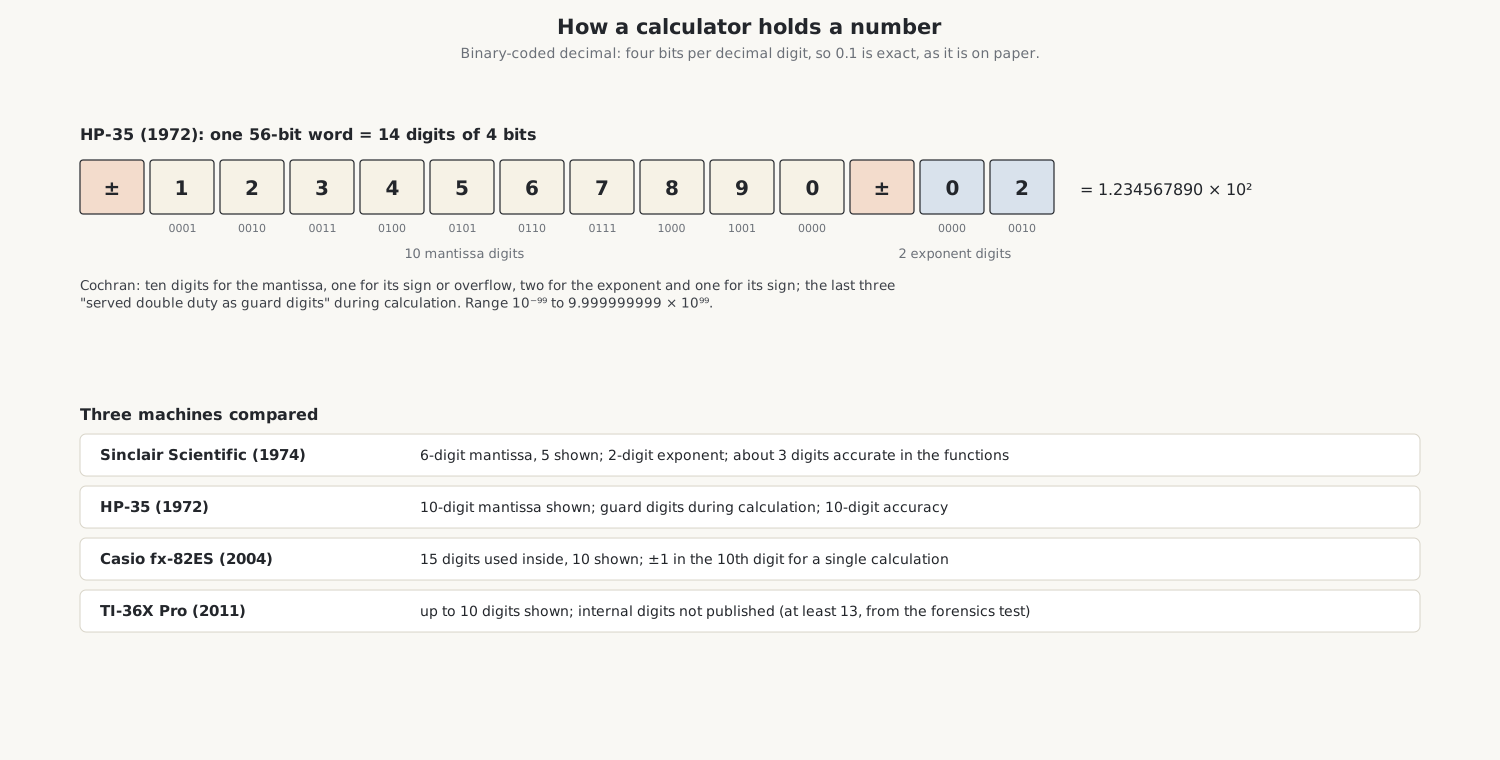
Guard digits are the extra digits a calculator carries but does not show, so that rounding errors pile up out of sight. My fx-82ES calculates with 15 digits and shows 10; Casio states the precision as “±1 at the 10th digit for a single calculation”. With the display set to three decimal places, 10 ÷ 3 shows 3.333 but is kept as 3.33333333333333. TI does not publish the TI-36X Pro’s internal digits; its guidebook says only that the display settings “affect only the display of results, and not the accuracy of the values stored in the unit, which remain maximal”. Its older TI-36 SOLAR worked with 12 digits inside, and the forensics test below shows the Pro keeps at least 13.
5.2 Briggs, Volder, Meggitt
The methods that calculators use for their functions are all variants of one idea: break the problem into steps, each of which needs only a shift and an addition, and keep a small table of constants for the steps.
- Henry Briggs, in Arithmetica Logarithmica of 1624, computed logarithms by repeatedly multiplying by numbers close to 1, whose logarithms he knew.
- Jack Volder devised CORDIC, the COordinate Rotation DIgital Computer, in 1956 at Convair to replace an analogue resolver in the B-58 bomber’s navigation computer, and published it in 1959. It turns a vector through a sequence of fixed angles to find sines, cosines and arctangents.
- J. E. Meggitt of IBM described decimal “pseudo-division and pseudo-multiplication” in 1962, Briggs’s method put in a form a machine could use.
- J. S. Walther of Hewlett-Packard unified the methods in 1971, so that one routine with different constants gives trigonometric, logarithmic and hyperbolic functions.
Cochran chose the method for the HP-35 after rejecting the alternatives: power series, polynomials, continued fractions and Chebyshev approximations were all “too slow because of the number of multiplications and divisions required to maintain full ten-digit accuracy over the proposed two-hundred decade range”. He chose “an iterative pseudo-division and pseudo-multiplication method described in 1624 by Henry Briggs … and later by Volder and Meggitt”, the method already used in HP’s desk calculators, and tuned its 12-digit constants to keep the error below one count in the 11th decimal place.
5.3 A logarithm, step by step
To find ln 3 the way the HP-35 does, keep multiplying 3 by (1 + 10⁻ʲ), as many times as the product stays below 10, first by 2, then by 1.1, then by 1.01 and so on. Each multiplication by 1.01 is a shift of two places and an addition. Count the multiplications, and subtract the matching stored logarithms from ln 10:
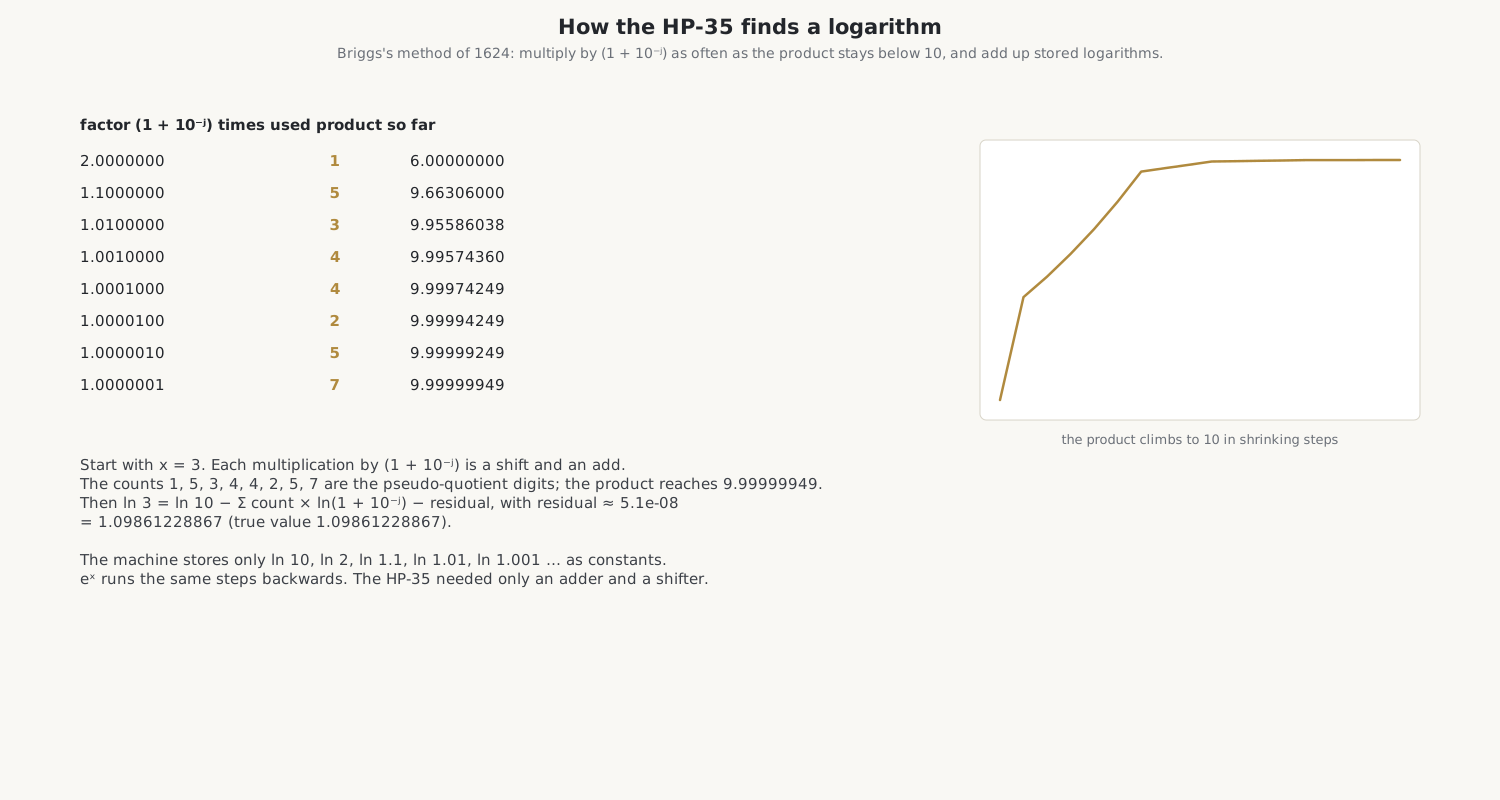
The counts come out as 1, 5, 3, 4, 4, 2, 5 and 7. The product reaches 9.99999949, and the small remainder, about 5 × 10⁻⁸, is its own logarithm to that accuracy. The answer, 1.09861228867, is right to every digit. The machine stores only ln 10, ln 2, ln 1.1, ln 1.01, ln 1.001 and so on, and runs the same steps backwards for eˣ, so that the two functions agree. Jacques Laporte’s analysis of the HP-35’s program shows exactly this method in its ROM.
5.4 Trigonometry by rotation
CORDIC finds a sine by rotating a vector. Start with the vector (1, 0) and the target angle, 30°. At each step, turn the vector by ±arctan(2⁻ⁱ), always towards the target: 45°, then 26.57°, then 14.04°, and so on, each angle a little more than half the last. Turning by arctan(2⁻ⁱ) needs no multiplication, only a shift by i places and an addition:
x ← x − d·y·2⁻ⁱ, y ← y + d·x·2⁻ⁱ
where d is +1 or −1. The vector grows a little at each step, by a fixed factor that is corrected once at the end.
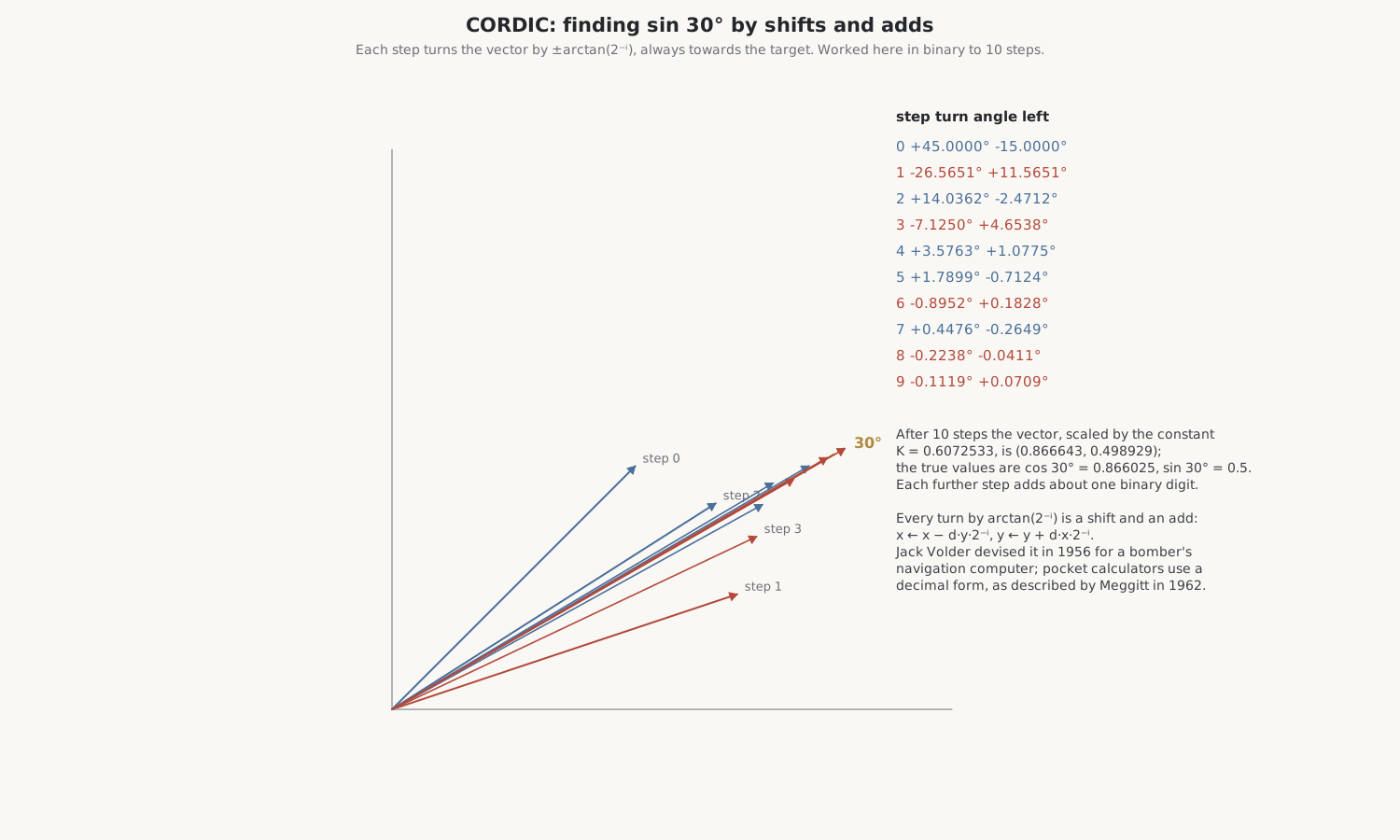
After ten steps the angle left is 0.07°, and the vector, corrected by the constant 0.6072533, is (0.866643, 0.498929), against the true cosine and sine of 30°, 0.866025 and 0.5. Each further step adds about one binary digit of accuracy. Calculators use a decimal version, with angles of arctan(10⁻ⁱ): the HP-35’s ROM holds arctan 1, arctan 0.1, arctan 0.01 and so on, and subtracts each as many times as it can, the same pseudo-division as for logarithms.
5.5 Sinclair’s shortcut
The Sinclair Scientific could not afford tables. With 320 instructions for everything, Ken Shirriff found, it computed sines and cosines by rotating a vector again and again by one fixed small angle, 0.001 radian, using only shifts and adds, until the total reached the target. It is CORDIC with a single step size: simple, short and very slow. A sine of 1 radian takes about a thousand rotations and 7.5 seconds; an arccosine of 0.0005 takes nearly two minutes. Logarithms were done by counting powers of 0.99 in a loop. The answers are good to about three decimal places, against the HP-35’s ten digits.
5.6 The calculator forensics test
The collector Mike Sebastian devised a test that fingerprints a calculator’s algorithms. In degree mode, enter 9, then take the sine, cosine, tangent, arctangent, arccosine and arcsine in turn. A perfect calculator returns exactly 9. Real ones lose about five digits on the way, and the exact error depends on the methods and the guard digits, so calculators that share their program give identical answers.
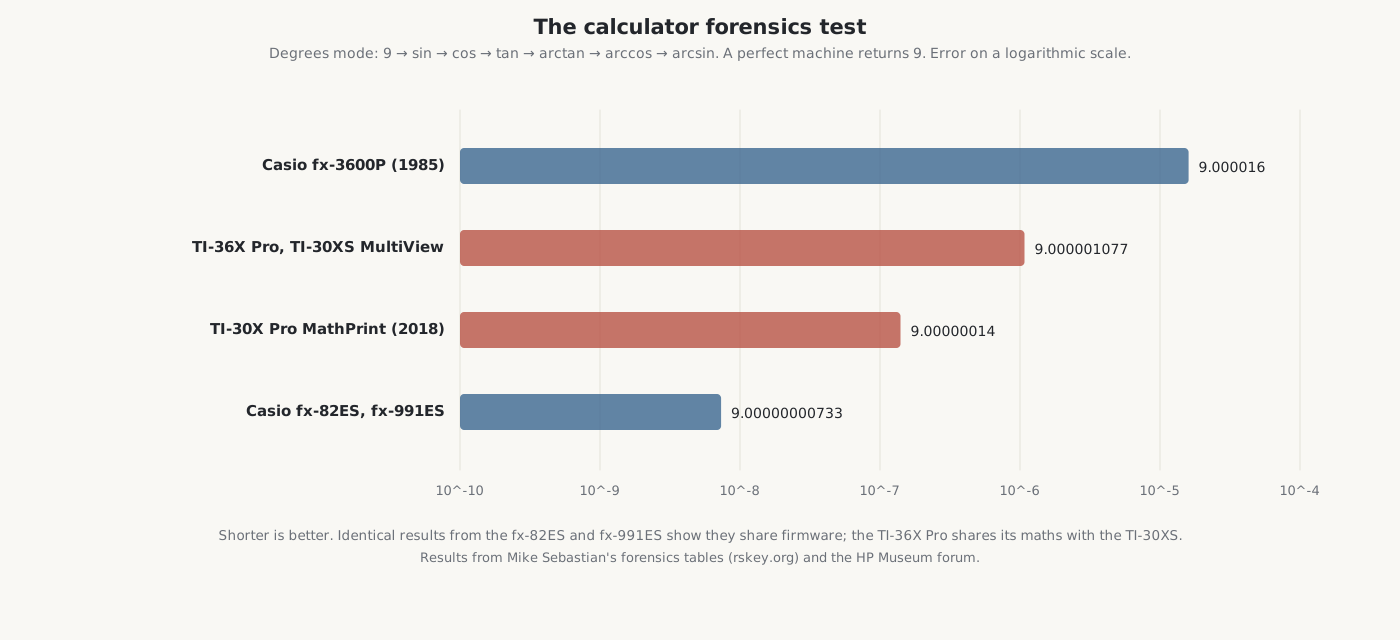
Table 1 — The calculator forensics test
| Calculator | Result |
|---|---|
| Casio fx-82ES | 9.00000000733343 |
| Casio fx-991ES | 9.00000000733343 |
| Casio fx-115ES, fx-300ES | 9.00000000733338 |
| TI-36X Pro, TI-30X Pro MultiView | 9.000001077 (9.000001077372 inside) |
| TI-30XS MultiView | 9.000001077372 |
| TI-30X Pro MathPrint (2018) | 8.999999860 |
My two calculators give their makers’ fingerprints. The fx-82ES matches the fx-991ES exactly, the evidence that they share one program. The TI-36X Pro matches the TI-30XS MultiView, so it shares TI’s maths routines, and it is about 150 times further from 9 than the Casio. Neither error matters for any real calculation: both are far below the ten digits shown in an ordinary result.
5.7 Equations, derivatives and integrals
The fx-82ES has none of these; they are among the fx-991ES functions that its keystroke hack exposes. On the larger Casios, the user’s guide says, integrals use the Gauss–Kronrod method, derivatives the central difference method, and SOLVE Newton’s method, which finds one root even when there are several.
The TI-36X Pro’s guidebook is equally frank. Its numerical derivative “uses the symmetric difference quotient method”, (f(x + H) − f(x − H)) / 2H with H = 0.001 unless changed, and “can return a false derivative value at a nondifferentiable point”. Its equation solver needs a sign change and reports “No sign change” when it cannot find one, and it shows Left − Rt, the difference between the two sides at its answer, so the user can see how close it came.
5.8 How a textbook fraction is stored
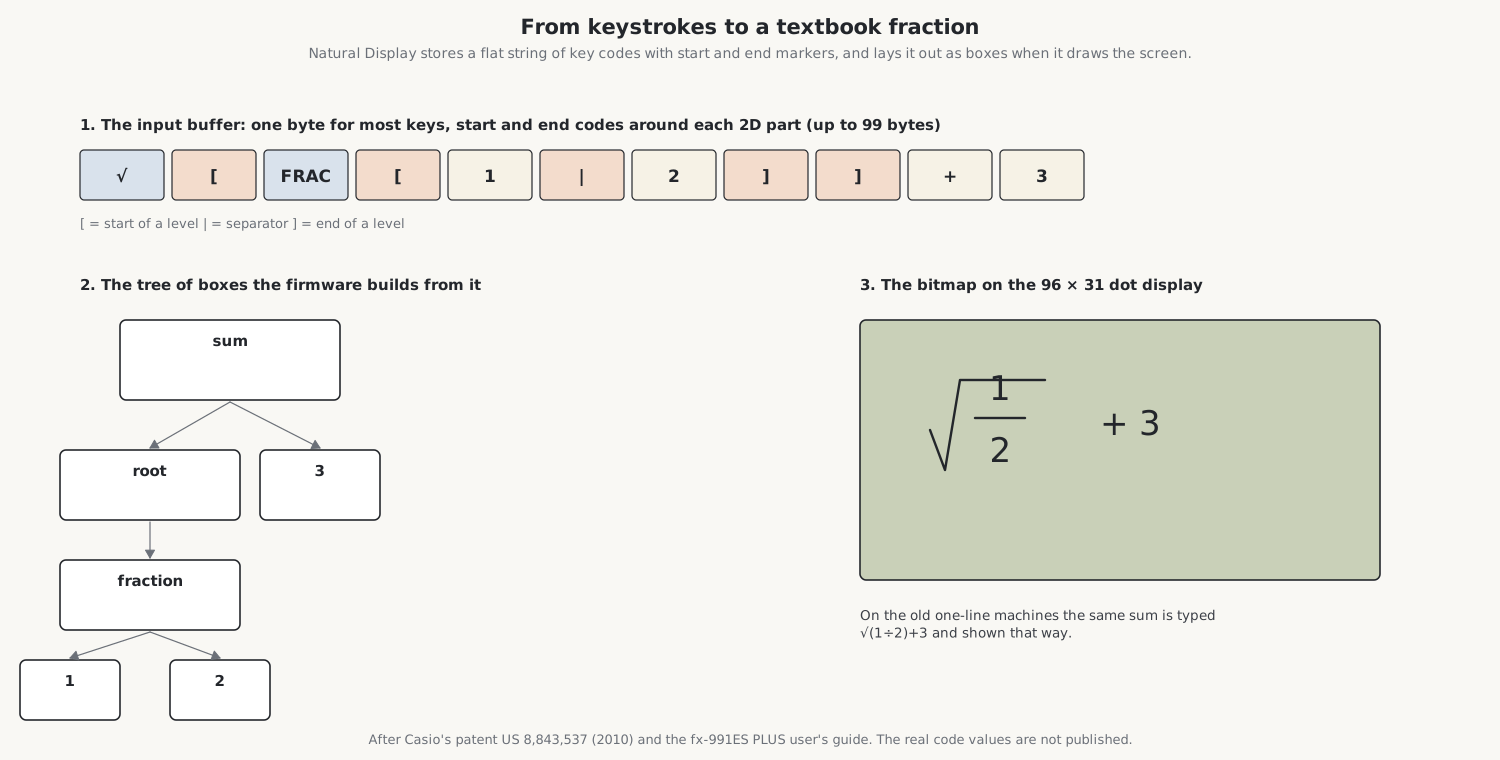
Natural Display and MathPrint make the calculator draw mathematics, but they do not store it as a picture. Casio’s patent of 2010 on its display describes the method: each key press is stored as a code in an input buffer, with control codes marking the start and end of each level of a two-dimensional expression, the numerator and denominator of a fraction or what is under a root. When the screen is drawn, the firmware reads the codes, builds the structure, and lays out each level as a box inside its parent, then draws the result as a bitmap. Casio’s guide gives the limits: up to 99 bytes, one for most keys and three to thirteen for some functions, and an expression no taller than two screens.
TI’s MathPrint allows up to four levels of templates inside one another, fractions, roots, powers, eˣ and 10ˣ, and reports TOO COMPLEX beyond that.
Sources
- David S. Cochran, “The HP-35 Design: A Case Study in Innovation” (Computer History Museum, 2010); D. S. Cochran, “Algorithms and Accuracy in the HP-35”, Hewlett-Packard Journal, June 1972, in the Library.
- Jacques Laporte’s analyses of the HP-35’s algorithms (archived at hpcalc.org); J. E. Meggitt, “Pseudo Division and Pseudo Multiplication Processes”, IBM Journal, April 1962; Wikipedia, “CORDIC”.
- Ken Shirriff, the Sinclair Scientific simulator and “Reverse engineering and simulating the Sinclair Scientific” (2013).
- Mike Sebastian, calculator forensics (rskey.org); the HP Museum forum for the TI-36X Pro result.
- Casio, fx-570ES PLUS and fx-991ES PLUS User’s Guide and fx-82ES User’s Guide; Casio patent US 8,843,537; TI, TI-36X Pro Guidebook.
Comments (0)