Nixie Calculators · Volume 6
Operating Them
There was no standard way to work an electronic calculator in the 1960s, and the Nixie machines are operated in at least four quite different ways. The ANITA is worked like the mechanical Comptometer it replaced, with a full keyboard and every column keyed at once. The Wang machines think in logarithms and have a register for them. The Friden EC-1115 and most Japanese ten-key machines use an “add-to” logic in which the plus-equals key does most of the work. And the Canon 163 uses algebraic entry, much like a modern pocket calculator. This volume explains each, with worked examples taken from the factory manuals in the Library. The arithmetic of every example has been checked. The keystrokes follow the manuals; where a manual gives only the method, the sequence shown is the one its method implies.
6.1 Before you switch on
Any of these machines may have been unused for decades, and the first rule is not to switch it on until it has been checked. Many Japanese machines are built for 100 V mains, European ones for 220 V, American ones for 117 V; check the plate and any voltage selector. Then read the repair volume, which explains how to bring an old machine up slowly. Once a machine is known to be safe, the following applies.
- Warm-up. Nixie machines need no warm-up, but the ANITA’s valves take a few seconds to heat, and multiplexed displays may show faint ghosts until the tubes are warm.
- Clearing. Every machine has a clear key, and many have two: one that clears the display or the last entry, and one that clears everything. Press the full clear before starting.
- Overflow. Most machines signal an overflow with a lamp, a flashing decimal point or a display of all 9s, and some lock until cleared. The ANITA gives no warning at all.
6.2 The ANITA Mk VIII: a Comptometer in neon
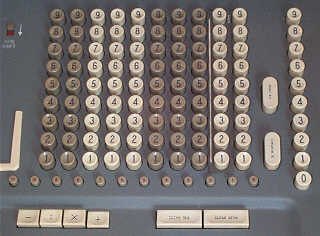
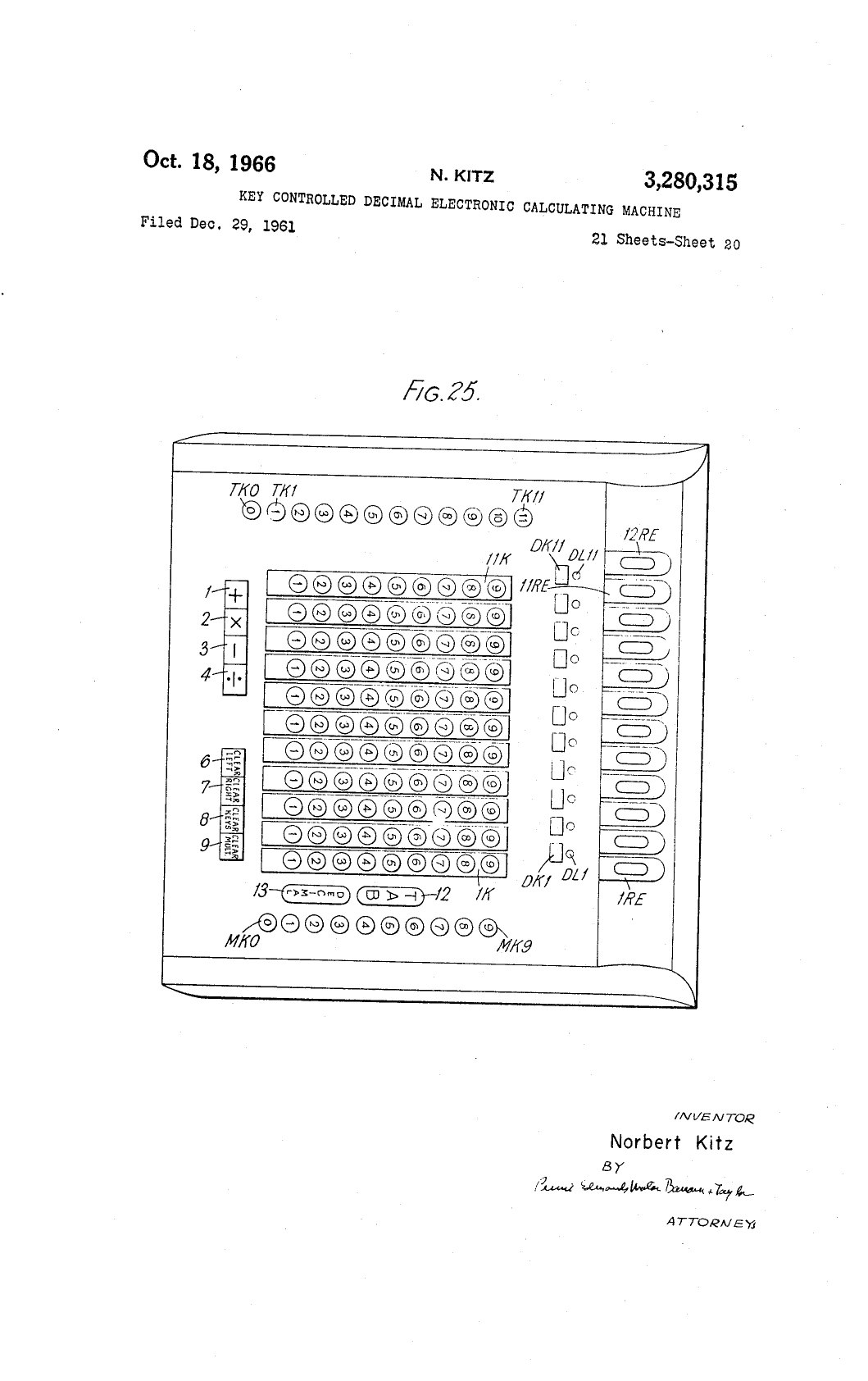
The ANITA’s keyboard is a full keyboard, laid out like a Comptometer’s: ten columns, one for each of the low-order ten digits, each with keys 1 to 9. There is no 0 key: a column with no key pressed is a zero. Twelve small keys set the decimal point. To the right is a separate multiplier column of keys 0 to 9, and four latching function keys select +, −, × and ÷. Other controls are CHECK X, CLEAR REG (clear the register), CLEAR KB (release the keyboard) and a NON-SHIFT switch whose purpose is not documented in the sources found.
Addition and subtraction. With + or − selected, the keys do not latch. As on a Comptometer, pressing a key adds its value into that column of the register at once: to add 2,345, press 2 in the fourth column, 3 in the third, 4 in the second and 5 in the first, which can be done with all four fingers together. Press them again to add 2,345 again. With − selected, each key press subtracts.
Negative numbers. The ANITA has no minus sign. A negative result appears as its ten’s complement: subtract 5,678 from 1,234 and the display shows
999999995556
which is 10¹² − 4,444, that is, −4,444. To read it, subtract each digit from 9 and add 1 to the result: 000000004443 + 1 = 4,444. Watch for a row of leading 9s.
Multiplication and division. For × and ÷ the keys latch, holding the multiplicand or divisor on the keyboard, and the multiplier column becomes active. Kitz’s patent describes the principle: each key pressed in the multiplier column makes the machine add the latched number repeatedly, as many times as the key’s value, and then shift one place for the next multiplier digit. The exact keying sequence for the Mk VIII is not spelled out in any source found, and the Old Calculator Web Museum says the use of the multiplier column is “not entirely clear yet”. The 59-page factory operating instructions survive, but only as a paper reproduction.
6.3 The Wang 300 series: thinking in logarithms
The Wang 300 calculators have three kinds of register: the work register, which is what the Nixies show; two independent adders, left and right, for sums; and the log register, which holds products. The source is Wang’s instruction manual, volume 1, of 1968. Its keys are colour-coded: black for the adders, blue for the log register, white for the numerals.
Every register holds 14 digits, of which 10 are displayed. Additions, subtractions, logarithms and exponentials use all 14; products, quotients, squares and square roots are worked to 14 digits and then rounded to 10.
6.3.1 Entering numbers
Key the number as you would write it, with the decimal point in its place: 3 . 1 4 1 6 puts 3.1416 in the window. For a negative number, key the positive number and then press CHANGE SIGN: . 0 6 9 CHANGE SIGN gives −.069. CLEAR DISPLAY clears the window only; CLEAR ALL clears everything.
6.3.2 Adding and subtracting
Each adder works independently. + (AL) adds the window to the left adder; − (AL) subtracts; RECALL ADDER (AL) shows it; CLEAR ADDER (AL) clears it; the right adder has the same four keys. The answer stays in the adder and also appears in the window.
Table 1 — Adding and subtracting
| Problem | Keys | Display |
|---|---|---|
| 2 + 5.7 | CLEAR ADDER (AL) 2 + (AL) 5 . 7 + (AL) | +7.7 |
| 9 + 4.5 | CLEAR ADDER (AR) 9 + (AR) 4 . 5 + (AR) | +13.5 |
| 2 − 1.5 | CLEAR ADDER (AL) 2 + (AL) 1 . 5 − (AL) | +.5 |
| 1.1 − 11 | CLEAR ADDER (AR) 1 . 1 + (AR) 1 1 − (AR) | −9.9 |
Two adders mean that two running totals can be kept at once.
6.3.3 Multiplying and dividing
Multiplication uses the log register, which is cleared to +1 after every operation. ENTER multiplies the window into the log register and clears the window; X= multiplies the window into the log register and brings the product to the window, clearing the log register to +1 again; ÷= divides the log register by the window and brings the quotient to the window.
Table 2 — Multiplying and dividing
| Problem | Keys | Display |
|---|---|---|
| 3 × 4.7 | 3 ENTER 4 . 7 X= | +14.1 |
| 2 × (−3) × 4 | 2 ENTER 3 CHANGE SIGN ENTER 4 X= | −24 |
| 2 ÷ 3 | 2 ENTER 3 ÷= | +.6666666667 |
| 1 ÷ 2 | 2 ÷= | +.5 |
| (2 × 3) ÷ (4 × 5) | 4 ENTER 5 X= ÷= ENTER 2 ENTER 3 X= | +.3 |
The reciprocal works because the log register holds 1 when it is clear: 2 ÷= divides 1 by 2. The last example follows the manual’s method for a fraction: form the denominator’s product (20) and take its reciprocal (÷= with the log register clear gives 1 ÷ 20), then ENTER it and multiply in the numerator’s terms.
Overflow shows as a flashing decimal point, and the decimal point is then wrong by ten places: 1,200,000 squared shows +144.0000000, flashing, and the true answer is 1.44 × 10¹². Below the machine’s range the answer is zero: .000000001 × .000000001 gives 0.
6.3.4 Roots, powers and logarithms
Table 3 — Roots, powers and logarithms
| Problem | Keys | Display |
|---|---|---|
| √2 | 2 √X | 1.414213562 |
| 3 × √2 | 3 ENTER 2 √X | +4.242640687 |
| (−11)² | 1 1 CHANGE SIGN X² | +121 |
| 2 × 5² | 2 ENTER 5 X² | +50 |
| ln 2 | 2 LOGeX | +00.69314718 |
| ln (2 × 8) | 2 ENTER 8 LOGeX | +02.77258872 |
| e⁻¹·⁵ | 1 . 5 CHANGE SIGN eˣ | .2231301601 |
| 2.1^1.9 | 2 . 1 LOGeX ENTER 1 . 9 X= eˣ | +4.094648818 |
The last line is the general method for any power xʸ: x, LOGeX, ENTER, y, X=, eˣ, which is ln x times y, then the exponential. For the y-th root of x, use ÷= instead of X=. Logarithms are natural (base e); for a common logarithm divide by ln 10. The manual warns that taking the log of a negative number gives the log of its absolute value and leaves a minus sign in the log register, to be cleared with X=; and that eˣ overflows if the window has more than two decimal places.
A worked problem from the manual. The monthly payment on a ten-year mortgage of $8,400 at 0.5 % a month is
R = 8400 × 0.005 ÷ (1 − 1.005⁻¹²⁰) = $93.26,
computed with the power method above for 1.005⁻¹²⁰ = 0.54963 and the adders for the subtraction.
6.3.5 Automatic accumulation
Three switches on the 320 keyboard make the machine keep running totals without extra keystrokes. With PROD ACCUM up, every result of X=, ÷=, √X and X² is also added into the left adder; with MULT ACCUM up, every multiplier or divisor is added into the right adder; with ENTRY ACCUM up, every number ENTERed is added into the right adder.
- 2 × 3 + 4 × 5 with PROD ACCUM up: key 2 ENTER 3 X= 4 ENTER 5 X=, then RECALL ADDER (AL): +26.
- The same with MULT ACCUM up instead: RECALL ADDER (AR) gives the sum of the multipliers, 8.
- 1/2 + 1/3 + 1/4 with PROD ACCUM up: 2 ÷= 3 ÷= 4 ÷=, RECALL ADDER (AL): 1.083333333.
- Statistics. With both switches up, square each of 3, 4, 8 and 11 with X²: the left adder collects Σx² = 210 and the right adder Σx = 26. The variance is Σx²/n − (Σx/n)² = 52.5 − 42.25 = 10.25. Turn the switches off before the final calculation, or it will be accumulated too.
The 360 has four storage registers (STORE 0–3, RECALL 0–3), and the 362 twelve, addressed by a command key and then a numeral key.
6.4 The Wang LOCI-2: the registers in plain view
The LOCI-2, the 300’s predecessor, works with three registers that its reference manual of 1966 calls W (the work register, displayed), A (the accumulator) and L (the logarithm register). Its keys are named for what they do to the registers, and the manual writes them as small transfer statements.
- Entering. Digits go into W from the left; the tube where the next digit will go is blanked as a cursor. If no decimal point is keyed, it is assumed after the last digit. The change-sign key changes the sign of W.
- Adding. The + key adds W into A (A + W → A); − subtracts. W keeps its value, so the same number can be added twice. A → W shows the total. To add 2 and 15: 2 +, 1 5 +, A → W, showing 17.
- Multiplying. The × key generates the natural logarithm of W and adds it to L: L + ln W → L, and clears W. ÷ subtracts it. x² adds twice the log and √ half of it. The ln⁻¹ key (L → W through the antilog) generates the antilogarithm of L and puts it in W, clearing L. So 2 × 3 is: 2 ×, 3 ×, ln⁻¹, and W shows 6.
- Logarithms directly. Because L simply holds a logarithm, it can be moved to W and back. L → W shows the logarithm itself; W → L loads a number into L as a logarithm. With L clear (holding 0, the log of 1), 1 W → L ln⁻¹ gives e = 2.71828 18284.
The manual’s harder example is the tenth root of 1,024: key 1024 ×, putting ln 1024 in L; L → W, ×, putting ln(ln 1024) in L; 10 ÷, leaving ln(ln 1024) − ln 10 = ln(ln 1024 ÷ 10); ln⁻¹, putting ln 1024 ÷ 10 in W; W → L; ln⁻¹: 2. It is a lesson in logarithms as much as in the machine.
The LOCI-2 runs programs of 80 steps from punched cards, with a decrement counter, conditional branches that skip four steps, and subroutine calls; the manual teaches programming with loops and Newton’s method. Its warnings are worth knowing: logarithms and antilogarithms may introduce an error in the tenth digit and occasionally the ninth; L holds only 12 digits; and beyond about 10¹⁸ or below 10⁻¹⁸ the machine gives wrong answers without warning.
6.5 The Friden EC-1115: ten keys and plus-equals
The Hitachi-built Friden EC-1115 of 1970 is typical of the Japanese ten-key machines that made up most of the Nixie market. Its service manual of December 1969 includes a full section of worked problems, and the examples here are from it.
The keys and switches. Ten digit keys and a decimal key; += (plus-equals) and −= (minus-equals); × and ÷; K, a latching constant key; R, the reverse key, which exchanges the last two numbers; R/O, a round-off switch, which rounds when set and truncates when not; C to clear and CE to clear the last entry; and a three-position decimal switch that sets the number of decimal places in the answer to 0, 2 or 5. A lamp shows a negative result, and another an overflow, after which the machine locks until cleared.
Floating in, fixed out. Numbers are keyed with their decimal points wherever they fall, but every answer is shown with the number of places set on the decimal switch, rounded or truncated by the R/O switch. A displayed result can be used as an entry.
In the tables, the decimal switch is set at 2 and R/O at round unless noted, and every calculation starts with C.
Adding and subtracting. The plus-equals and minus-equals keys work like an adding machine’s: each number is followed by the key that adds or subtracts it.
Table 4 — The Friden EC-1115: ten keys and plus-equals
| Problem | Keys | Display |
|---|---|---|
| 946 + 583 + 123 | 946 += 583 += 123 += | 1652.00 |
| 2.63 + 0.57 + 0.02 | 2.63 += 0.57 += 0.02 += | 3.22 |
| 657 − 492 | 657 += 492 −= | 165.00 |
| −530 + 829 | 530 −= 829 += | 299.00 |
| 139 − 567 | 139 += 567 −= | 428.00, with the minus lamp |
Multiplying. Key the first factor, ×, the second, and +=. In a chain, each × completes the previous multiplication.
Table 5 — The Friden EC-1115: ten keys and plus-equals
| Problem | Keys | Display |
|---|---|---|
| 12 × 24 | 12 × 24 += | 288.00 |
| 6.123 × 47.89 | 6.123 × 47.89 += | 293.23 |
| 3.69 × 65.41 × 1.479 | 3.69 × 65.41 × 1.479 += | 356.97 (241.36 shows after the second ×) |
| −369 × 682 × (−34) | 369 −= × 682 × 34 −= | 8556372.00 |
The last example uses the sign keys: −= after the first factor makes it negative, and −= in place of += at the end changes the sign of the last factor.
Constant multiplier. Latch the K key down and the second factor stays as a constant: 123 × 4.56 += gives 560.88, then 563 += gives 2567.28, and 213 += gives 971.28. With K latched, repeated += multiplies by the first number again, giving powers: 25 × += gives 625.00 (25²), another += gives 15625.00 (25³), and another 390625.00 (25⁴).
Dividing. Key the dividend, ÷, the divisor and +=. With the decimal switch at 5:
Table 6 — Dividing. Key the dividend, ÷, the divisor and +=. With the decimal switch at 5
| Problem | Keys | Display |
|---|---|---|
| 145 ÷ 12 | 145 ÷ 12 += | 12.08333 |
| 4962.184 ÷ 13.2 | 4962.184 ÷ 13.2 += | 375.92303 |
| 369 ÷ 123 ÷ 456 | 369 ÷ 123 ÷ 456 += | 0.00658 (3.00000 shows after the second ÷) |
With K latched, the divisor is constant: 297 ÷ 1364 += gives 0.21774, then 6428 += gives 4.71261 and 1000 += gives 0.73314. And 12367 ÷ 12 += gives 1030.58333; further presses of += divide by 12 again, giving 85.88194 (÷ 12²) and 7.15683 (÷ 12³).
Rounding. With the decimal switch at 2, 45.769 × 3.52 gives 161.11 with R/O set and 161.10 with it off: the exact product is 161.10688.
A compound-interest problem. The amount of an annuity of $12,300 a year for five years at 5 %:
12300 × ((1.05)⁵ − 1) ÷ 0.05 = 67,965.26
The manual’s keystrokes, with the decimal switch at 5 and K latched: 1 += 0.05 += gives 1.05000; × += += += += raises it through 1.10250, 1.15763, 1.21551 to 1.27629; then, with K released, 1 −= gives 0.27629, ÷ 0.05 gives 5.52580, and × 12300 += gives the answer.
6.6 Other machines in brief
- Canon 163. Algebraic entry: key 12 × 3 = and the machine holds the × until = is pressed, as a pocket calculator does. It has two memories, M1 and M2, with keys to add into and subtract from them, and an M2-sum mode that adds every multiplier or dividend into M2 automatically. A reverse key (RV) brings back the last operand or result, which survives Clear. Overflow brings all 9s to the display. Hilpert’s theory of operation lists every procedure.
- Casio AL-2000. Ten-key. Square root is the ÷ key with no divisor: 81 √ gives 9.00. KC clears the keyboard and AC everything except the memory registers. Four memories each have a lock switch for constant or accumulate. A program mode holds 30 one-digit instructions in core memory, kept when the machine is switched off; there are no branches, but instruction 6 pauses for input and 7 halts.
- Anita 1011. Key the first number, press Enter 1st Number, key the second and press the operation key; a latching C key holds a constant, and leaving it down by mistake gives strange results.
- Facit 1124. No + key at all; a recall key brings back the buffer and another the memory; a rotary switch sets 0, 2, 4 or 6 decimal places; a mechanical interlock stops two keys being pressed at once.
- Sharp Compet CS-10A. A full keyboard of ten columns and twenty digits, with a rotary-switch constant panel on the front recalled by a key.
6.7 How a calculator takes a square root
The machines that offer square root, from the Wang to the Canon 163, do it without any multiplication, and the method is worth knowing because it explains why a square root takes longer than a division. Hilpert describes the Canon 163’s as “a variation of a (once-common) manual method, similar to long division”. The classic form, which mechanical calculator operators used, rests on the fact that the sum of the first n odd numbers is n²: 1 + 3 + 5 = 9 = 3².
To find √2 to four figures, split the number into pairs of digits from the decimal point, 2.00 00 00, and work pair by pair:
- From 2, subtract 1 (it goes), then 3 (it does not). One subtraction: the first digit is 1. Remainder 1.
- Bring down the next pair: 100. Double the root so far and append a 1: 21. Subtract 21, 23, 25 and 27 in turn, the odd numbers upward from 21, leaving 79, 56, 31, 4; 29 does not go. Four subtractions: the next digit is 4. Remainder 4.
- Bring down 00: 400. Double the root so far, 14, and append 1: 281. 281 goes once, leaving 119; 283 does not. The next digit is 1.
- Bring down 00: 11900. From 2821: 2821, 2823, 2825, 2827 go, leaving 604; 2829 does not. The next digit is 4.
So √2 = 1.414…, found entirely by subtraction and shifting, which is exactly what a serial adder and a shift register can do.
Comments (0)